
How to Use SaleSmartly with Amazon.com: A Practical Integration Guide
Managing customer questions on Amazon can feel like a constant back-and-forth between different tabs, email threads, and translation tools. As you scale, the scattered nature of Amazon’s Buyer-Seller Messaging service can slow down your team and hurt the buying experience. SaleSmartly offers a way to bring that communication into a unified, AI-powered inbox—without disrupting how you already sell on Amazon.com.
This guide walks you through the exact workflow, setup steps, and practical examples that show how the two platforms work together. You’ll see how to forward Amazon messages into SaleSmartly, automate replies with an AI agent, and serve customers in over 134 languages—all from a single pane of glass.
Why Connect SaleSmartly to Amazon.com?

How to Use SaleSmartly with Amazon.com: Complete Seller Guide product interface and feature overview.
Amazon.com’s built-in messaging system is functional but limited. Replies are handled via email, there’s no intelligent routing, and manual translation slows everything down for international buyers. SaleSmartly fills these gaps while adding capabilities you don’t get natively:
- Unified omnichannel inbox – Combine Amazon messages with LiveChat, WhatsApp, Facebook Messenger, Instagram, Email, and more in one place. Your team never has to bounce between separate dashboards.
- AI-powered automation – Deploy a chatbot that instantly responds to order-status questions, return policies, or shipping details, even outside business hours.
- Real-time translation – Two-way automatic translation across 134 languages means you can serve shoppers in their native language, just like a local brand.
- Collaboration & assignment – Auto-route specific Amazon inquiries to the right agent, tag high-priority customers, and track response times with built-in analytics.
- Customer memory – Every interaction is saved under a unified customer profile, so you always have the full context when a repeat buyer reaches out.
By connecting Amazon.com, you turn SaleSmartly into the central nervous system of your customer service strategy. The result? Faster first-response times, fewer missed messages, and a more professional brand image.
The Integration Workflow Overview

How to Use SaleSmartly with Amazon.com: Complete Seller Guide product interface and feature overview.
Here’s the high-level flow you’ll set up in the next section:
- Amazon buyer sends a message – This appears in your Amazon Seller Central and triggers an email notification to your registered seller email.
- Message forwarded to SaleSmartly – Using email forwarding rules, that notification (with the customer’s original message and Amazon’s anonymized reply address) lands in a dedicated support inbox integrated into SaleSmartly’s email channel.
- AI pre-processes the inquiry – SaleSmartly’s AI agent reads the email, translates it if necessary, and suggests a reply based on your predefined templates and knowledge base.
- Agent (or bot) responds – A human agent reviews and sends the reply in their own language. SaleSmartly instantly translates the response back into the buyer’s language and delivers it through Amazon’s messaging system.
- Conversation is logged – The entire thread, buyer details, and tags are saved in SaleSmartly’s CRM for future reference and analytics.
You maintain compliance with Amazon’s communication guidelines (replies stay within the Buyer-Seller Messaging system), and your team gets all the productivity benefits of an AI-driven helpdesk.
Step-by-Step Setup: Forward Amazon Messages into SaleSmartly
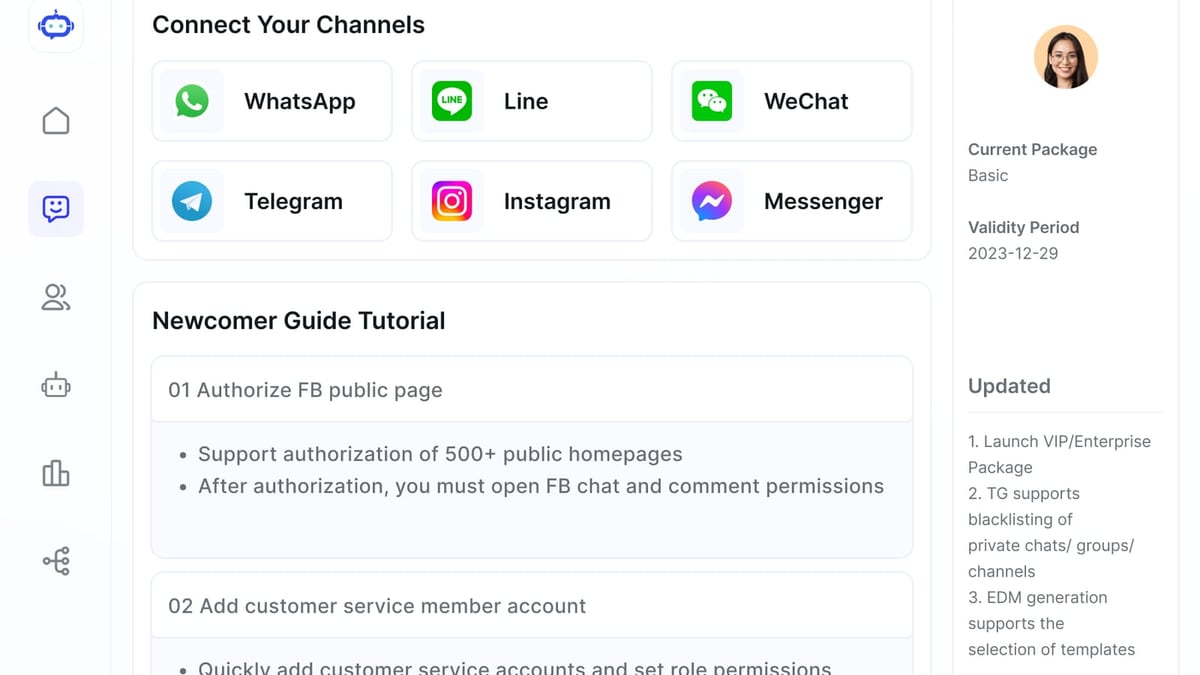
How to Use SaleSmartly with Amazon.com: Complete Seller Guide product interface and feature overview.
1. Configure Email Forwarding in Amazon Seller Central
Amazon sends buyer-seller message notifications to the primary email address on your account. While you can change this email, a more reliable approach is to keep your existing email (so you have a backup) and create an automatic forwarding rule from that inbox to a dedicated support email address.
For example, if your seller email is seller@yourbrand.com, set up a Gmail filter or Outlook rule that forwards any email containing subject:"New Message from Amazon Customer" to support@yourbrand.com. This dedicated address will become the connection point to SaleSmartly.
Important: The forwarded email must preserve the original body text and the From header that Amazon uses. That way, when SaleSmartly replies through this email channel, it will reply to the anonymized Amazon email address (e.g., x-abcdef123@marketplace.amazon.com), ensuring the response reaches the buyer on-platform.
2. Connect Your Email Account to SaleSmartly
Inside SaleSmartly, go to Settings > Channels > Add Channel and select Email. Enter the dedicated email credentials (or set up an IMAP/SMTP connection), and SaleSmartly will pull all incoming messages into its unified inbox.
All forwarded Amazon messages will now appear as open conversations inside SaleSmartly, right alongside your website chat, WhatsApp, and social media messages. Your team can view, reply, and collaborate on them without ever logging into Amazon Seller Central.
3. Set Up an AI-Powered Auto-Responder
Once emails are flowing, create an AI agent to handle repetitive inquiries on autopilot:
- Navigate to Robot > Create a New Bot.
- Choose a template like “E-commerce Customer Service” and tailor it with your Amazon-specific policies (returns, shipping times, product FAQs).
- Set a trigger rule so that any new email from an Amazon address (easily identified by the anonymized sender) is first processed by the AI.
- The bot can answer simple questions immediately; if it detects a complex issue, it will escalate to a human agent with a pre-translated summary of the problem.
For advanced automation, use SaleSmartly’s visual flow builder to create sequences like: “If order status requested → look up in your backend via API or webhook → compose a personalized reply with tracking info.” This is where the platform’s six core modules (omnichannel chat, automation, teamwork, CRM, data analysis, and translation) really shine.
4. Enable Real-Time Translation for Global Buyers
Activate Real-Time Translation under Settings > Translation. Select your team’s working language and the languages you want to support automatically. When an Amazon message arrives in German, Spanish, or Japanese, SaleSmartly will instantly display a translated version to your agent. As the agent types a reply in English, SaleSmartly translates it back before sending, all without changing the conversation window.
This feature alone can cut response times by 60–80% for cross-border sellers and eliminates the need to hire multilingual staff.
Practical Example: Handling a Cross-Border Amazon Inquiry
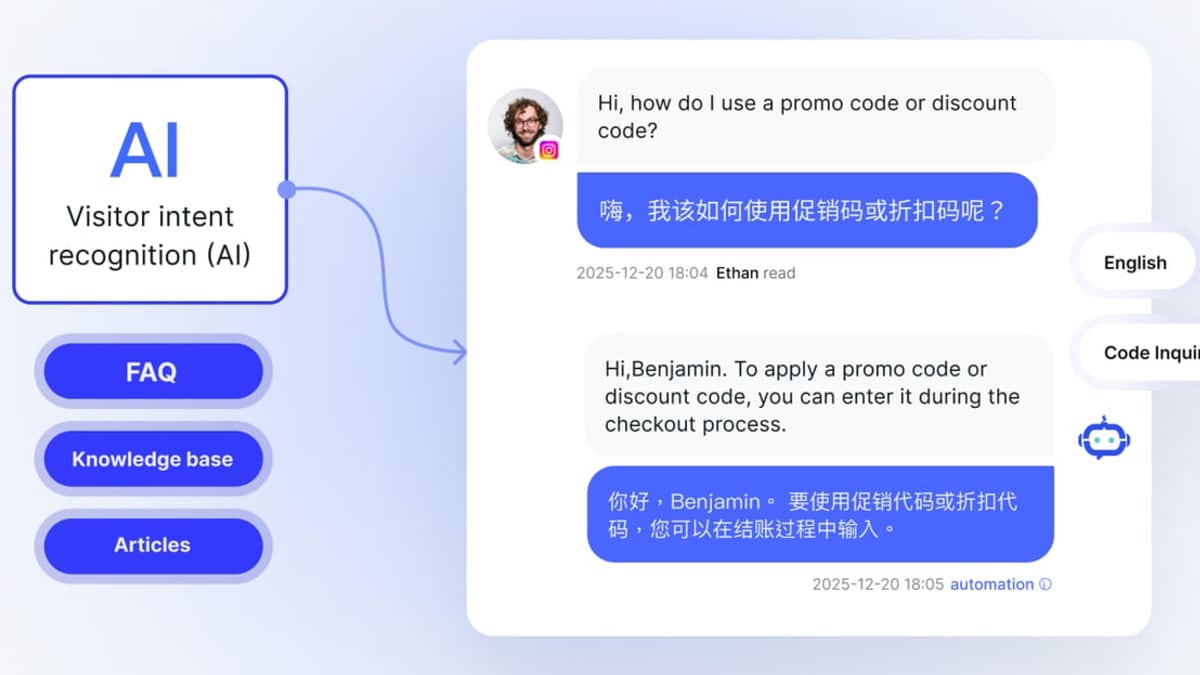
How to Use SaleSmartly with Amazon.com: Complete Seller Guide product interface and feature overview.
Let’s walk through a real-life scenario. Imagine you sell yoga mats on Amazon.com, and a customer from Spain sends this through Amazon’s Buyer-Seller system:
“Hola, ¿este tapete incluye correa de transporte?”
Without SaleSmartly:
- Your inbox gets the notification, you copy the text into Google Translate, realize they’re asking if the mat includes a carrying strap.
- You draft an answer in English, translate it back to Spanish, paste into Amazon’s reply field, and hit send. This loop takes 10–15 minutes.
With SaleSmartly:
- The email lands in your unified inbox already translated: “Hello, does this mat include a carrying strap?”
- A pop-up suggests your pre-saved template for “product accessories – carrying strap.” The AI agent can auto-reply in Spanish with accurate information, or you can review and tweak the response in English.
- SaleSmartly translates your English reply to Spanish and sends it to the buyer. The entire process takes under 60 seconds.
- The customer profile is automatically enriched with a “Spain” tag and a “yoga mat question” note, helping you segment and retarget later.
What Problems Does This Combination Solve?
Fragmented communication: Amazon sellers often juggle messages from the marketplace, their own website chat, and social platforms. SaleSmartly consolidates all channels into one inbox, giving you a true 360-degree view of each customer.
Slow multilingual support: Real-time translation removes the language barrier instantly. Teams can support customers in 134 languages without hiring native speakers, opening up new markets overnight.
Manual, repetitive answers: The AI chatbot deflects the majority of routine queries—order status, shipping policies, sizing charts—freeing your team for high-touch and complex issues.
Missed opportunities: With built-in CRM and bulk messaging, you can later send targeted campaigns (e.g., an exclusive discount to Spanish yoga enthusiasts) through WhatsApp or email, turning one-time Amazon shoppers into repeat buyers.
Team visibility and accountability: Auto-assignment, internal notes, and real-time analytics ensure nothing slips through the cracks during peak seasons.
If you’re scaling across multiple sales channels, you might also find our guide on how to use SaleSmartly with Lazada helpful—the same email-forwarding principles apply to other marketplaces.
Related reading
- SaleSmartly vs Olark vs DelightChat: Which Tool Wins in 2026? - Compare SaleSmartly, Olark, and DelightChat on channels, AI, translation, ecommerce, accessibility, and pricing. Find the best fit for cross-border, website chat, or Shopify marketing.
- SaleSmartly vs DelightChat: AI-Powered Omnichannel Face-Off 2026 - Compare SaleSmartly vs DelightChat for omnichannel support and marketing. See which platform excels with AI agents, translation, channels, and CRM for cross-border teams.
- Intercom Review 2026: Is the AI-First Platform Worth It? - Read our in-depth Intercom review covering Fin AI, omnichannel support, pricing (from $39/seat), setup, and real user insights. See if it fits your team.
Sources and further reading
- Salesmartly | LinkedIn - Salesmartly | 24 followers on LinkedIn. Best AI-powered Omnichannel Engagement Platform | Salesmartly is a powerful omnichannel customer service platform packed with smart features and effective AI integration. The platform unifies sales, marketing, and customer service by managing conversation from all business channels — Zalo, TikTok, Facebook, Instagram, and more. You can stay connected anytime, anywhere, whether on desktop, IOS & Android Devices.
- SaleSmartly Introduction - Discover SaleSmartly's all-in-one customer engagement platform! Streamline live chat, AI automation, and omnichannel support for e-commerce and service teams. Watch the demo now!
FAQ
Does SaleSmartly directly integrate with Amazon’s API? SaleSmartly doesn’t offer a native Amazon Selling Partner API connection for messaging. The recommended method is email forwarding, which preserves Amazon’s anonymized reply system and ensures full compliance. Many enterprise helpdesks use this same pattern successfully.
Will replying via email trigger Amazon’s policy against off-platform communication? No, because the reply goes through Amazon’s anonymized email address, the message stays strictly within the Buyer-Seller Messaging framework. Amazon’s system simply routes it to the customer. Always include the required prefix (e.g., “Order #”) and never include promotional links that violate Amazon’s terms.
Can I use SaleSmartly to proactively message Amazon buyers? You can only proactively message a buyer if they have contacted you first or if you’re sending a critical shipment update. SaleSmartly can help you schedule and automate those permitted messages. Mass marketing to Amazon buyers is generally prohibited; use SaleSmartly’s segmentation to reach customers you’ve legally obtained contact information from outside Amazon (e.g., through your own website or email signup).
How does SaleSmartly compare with other omnichannel tools for e-commerce? SaleSmartly stands out for its built-in real-time translation (up to 134 languages), extensive social channel support, and affordability for cross-border teams. It’s a strong alternative to tools like DelightChat or Zendesk when your focus is global customer service. For a detailed side-by-side breakdown, check out SaleSmartly vs DelightChat.
Do I need technical skills to set this up? No. Configuring email forwarding takes a few minutes, and SaleSmartly’s visual bot builder and pre-made templates mean you don’t need coding knowledge. The platform’s onboarding team also offers one-on-one deployment support.
Conclusion
Using SaleSmartly alongside Amazon.com isn’t about replacing the marketplace’s native tools—it’s about supercharging your customer service engine. By funneling Amazon messages into a single, AI-enriched workspace, you gain speed, clarity, and the ability to serve customers in any language, all while staying compliant with Amazon’s rules.
The result is a seamless support experience that turns buyer inquiries into fast resolutions and, ultimately, more positive reviews and repeat business. Whether you’re a solo seller or managing a large cross-border operation, this integration lets you put your customer communication on autopilot and focus on growth.
Ready to unify your Amazon support? Start your SaleSmartly free trial and connect your first email channel today.