
How to Use SaleSmartly with eBay: A Seller’s Guide
If you sell on eBay, you know buyer questions come from everywhere—eBay messages, WhatsApp, Facebook, Instagram, even email. Juggling them all eats into your time and slows down responses. SaleSmartly gives you a single dashboard to pull those conversations together, automate the repetitive ones, and reply in 134 languages. This guide shows you how to combine SaleSmartly’s omnichannel AI with your eBay business so you can answer faster, sell more, and keep buyers coming back.
Why Pair SaleSmartly with Your eBay Store

eBay product interface.
eBay already provides a secure marketplace with millions of buyers, built‑in payments, and seller tools. But its native messaging stays inside eBay. Meanwhile, your customers often reach out on external channels—especially if you’ve shared a WhatsApp number on your listings, run Facebook ads, or built a social following. SaleSmartly fills that gap. It brings eBay’s transactional strength together with always‑on, multilingual, AI‑driven customer communication.
Here’s what the combination solves:
- Fragmented conversations – eBay messages, WhatsApp chats, Messenger, Telegram, LINE, and Instagram DMs all land in one place.
- Repetitive FAQ overload – AI chatbots handle “Where is my order?”, “What’s your return policy?”, and “Do you ship to my country?” instantly.
- Language barriers – Real‑time translation in 134 languages means a German buyer gets a German reply, even if your team speaks only English.
- Slow lead follow‑up – Automation rules can tag high‑intent buyers and trigger personalized offers after an eBay purchase.
- No unified customer history – The built‑in CRM records every interaction across channels so you never ask “Can you repeat your question?”
How the Workflow Looks (Practical Example)

SaleSmartly product interface.
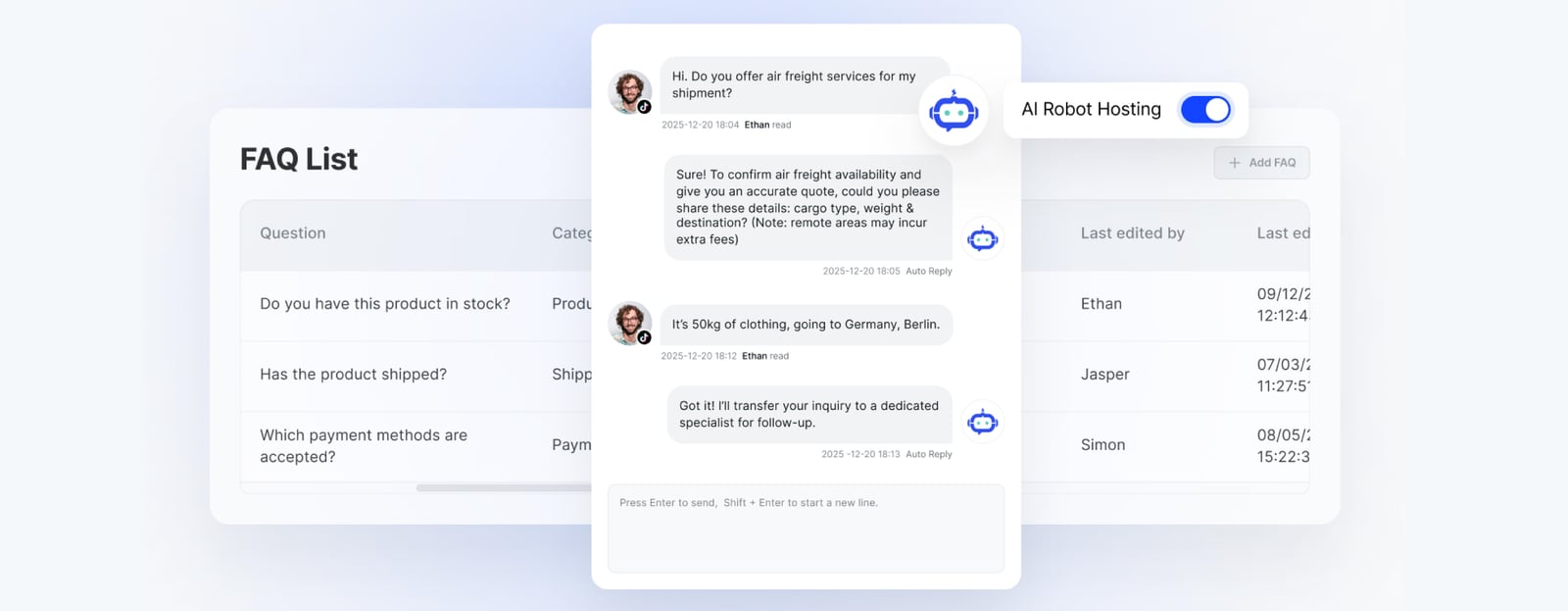
Imagine you sell refurbished smartphones on eBay. A buyer from Spain sees your item and messages you on WhatsApp asking about battery health. At the same time, another buyer opens a return request via eBay. Normally, you’d be switching tabs and apps. With SaleSmartly, both conversations appear in the Live Chat panel. The AI agent instantly answers the battery question using your pre‑set knowledge base, in Spanish. For the return, the system recognizes the eBay order ID you pasted and pulls up the buyer’s details, your return policy, and even suggests a pre‑written reply.
If the WhatsApp inquiry turns into a potential bulk order, SaleSmartly tags the contact as “B2B lead” and notifies your team in Slack via one of our integration guides — all without leaving the platform.
Step‑by‑Step: Setting Up SaleSmartly for Your eBay Business
SaleSmartly product interface.
1. Create Your SaleSmartly Account (Free Trial Available)
Go to the SaleSmartly website and click Start for Free. You can register with a phone number, Google, or business social accounts. New users get a 7‑day Pro trial, letting you test channels and AI features before committing. Official setup docs walk you through securing your account and understanding the dashboard navigation.
2. Connect the Channels Your eBay Buyers Actually Use
Inside SaleSmartly, head to Integration or the App Store. Add the messaging channels most relevant to your audience. For cross‑border sellers, WhatsApp, Facebook Messenger, Instagram, Telegram, and LINE are top picks. If you use email for post‑sale follow‑ups, connect that too. Each channel requires a quick authorization—SaleSmartly’s interface guides you. Once connected, all incoming messages stream into the unified inbox.
Pro tip: Add a WhatsApp “Click to Chat” link to your eBay listing descriptions. When a buyer taps it, the conversation lands inside SaleSmartly, not your personal phone.
3. Build an eBay‑Specific AI Chatbot
Go to Robot (or Al Employee in newer projects) and create a flow‑based or AI‑powered chatbot. For eBay selling, focus on these intents:
- Shipping & tracking – Train the bot with answers about processing times, carriers, and where to find tracking numbers.
- Returns & refunds – Embed your eBay return policy. The bot can ask for the order ID and explain the steps or start a return authorization.
- Product details – Upload specs for your top listings. The bot can answer “Is this phone unlocked?” or “What’s the storage capacity?”
- Cross‑border queries – Use the multilingual knowledge base; ask the bot to detect the buyer’s language and reply accordingly.
You can enhance the AI agent with external LLM integrations, as detailed in our SaleSmartly vs Tidio vs LiveChat comparison. The GPTBots integration mentioned in the community (see SaleSmartly 2026 Guide) turns flow‑based bots into context‑aware conversationalists, but SaleSmartly’s native AI covers most eBay scenarios out of the box.
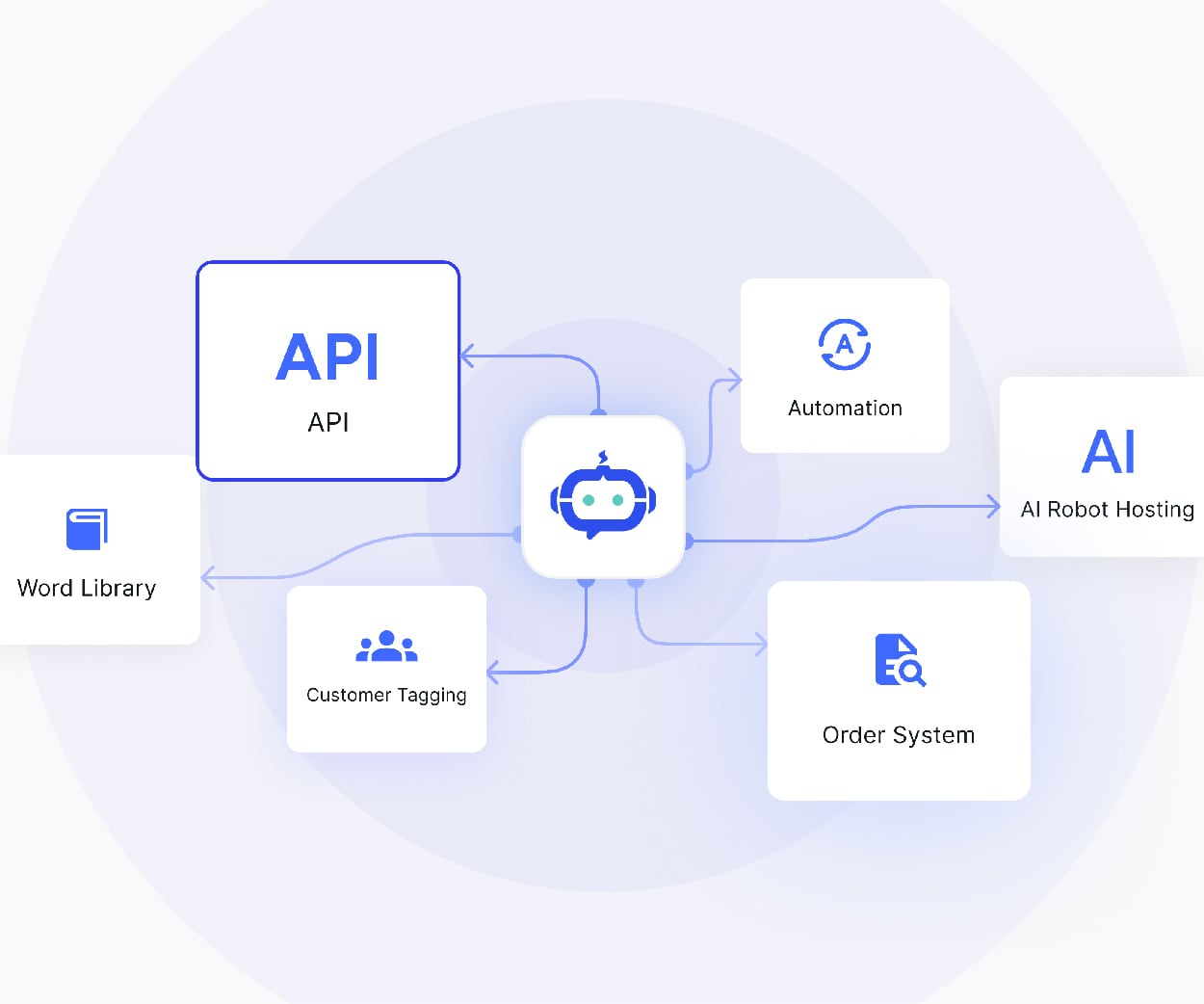
4. Set Up Automation Rules for eBay Scenarios
Automation rules let you react without lifting a finger. In SaleSmartly, combine triggers and actions:
- Tag eBay buyers – If a contact’s message contains an eBay order number (custom pattern), automatically add the tag “eBay Buyer”.
- Auto‑assign urgent requests – If a buyer says “refund” or “dispute”, route the chat to your senior support agent immediately.
- Send a feedback request – 24 hours after a conversation closes, trigger an email or WhatsApp message asking for a review on eBay.
- Follow‑up on abandoned interest – If a buyer asked about a product but didn’t purchase, schedule a gentle reminder message via their preferred channel after 48 hours.
5. Use Real‑Time Translation to Serve Global Buyers
Enable translation in the Live Chat settings. SaleSmartly automatically translates incoming messages into your agent’s language and outgoing replies into the buyer’s language. For an eBay seller shipping worldwide, this feature alone can double your addressable market. There’s no need to hire multilingual staff—the AI keeps conversations flowing naturally.
6. Centralize Customer Records and Track Performance
Every interaction is saved under the Customer section, alongside tags, order references, and chat history. When a repeat buyer messages on a different channel, the entire conversation thread is visible. Use Reports to measure first‑reply time, resolution rate, and channel performance. Identify which channels drive the most eBay sales and double down.
When SaleSmartly + eBay Works Best (and When It Might Not)
SaleSmartly product interface.
This combination shines if you:
- Sell internationally and need multilingual support.
- Use multiple social channels to promote your eBay listings.
- Handle more than 20 buyer messages a day and feel the strain.
- Want to build a brand beyond the eBay marketplace, capturing leads for your own website or WhatsApp list.
If you only sell a handful of items and get a few messages a month, eBay’s native messaging is enough. But once you scale, the disjointed inboxes become a growth blocker. SaleSmartly starts with a freemium plan and scales to $12.72/month, so it grows with you.
For a broader comparison with other platforms, check our Top 10 AI Omnichannel Communication Platforms for Cross‑Border 2026. And if you’re evaluating other tools, our SaleSmartly vs HubSpot vs SleekFlow article breaks down features and pricing.
Sources and further reading
- SaleSmartly 2026 Guide: AI Chatbot + GPTBots Integration - Learn about what SaleSmartly is, its features, GPTBots integration, and user reviews to see how it can offer AI-driven customer support for your business.
- Top 10 SaleSmartly Alternatives & Competitors in 2026 - G2 - Top 10 SaleSmartly Alternatives & Competitors in 2026 - G2G2https://www.g2.com › products › competitors › alternativesG2https://www.g2.com › products › competitors › alternatives
- Step 1: Create a SaleSmartly Account - Step-by-step guide to creating a SaleSmartly account: Unify customer communication, automate workflows, and enjoy a free 7-day Pro trial.
Frequently Asked Questions
Does SaleSmartly directly integrate with eBay?
No, there’s no plug‑and‑play eBay API integration inside SaleSmartly. However, you achieve a full workflow by connecting the external channels your eBay buyers use (WhatsApp, Messenger, etc.) and by routing eBay’s email notifications into the platform. Many sellers also use SaleSmartly’s email channel to pull in eBay message alerts, centralizing everything.
Can I answer eBay messages from inside SaleSmartly?
Not directly through the eBay platform interface. But you can handle any off‑eBay conversation about your eBay items – including pre‑sale and post‑sale support via WhatsApp, Facebook, or Telegram – all within SaleSmartly. This reduces the need to monitor multiple inboxes.
How does the AI know my eBay return policy?
You upload your policy documents or paste the text into the chatbot’s knowledge base. The AI parses it and answers buyer questions accurately. You can update the knowledge base anytime, and changes take effect instantly.
Is SaleSmartly secure enough for eBay customer data?
Yes. SaleSmartly holds ISO 27001, ISO 27701, and CCRC security certifications, ensuring compliance with international data protection standards.
Can I manage eBay buyer follow‑ups with SaleSmartly?
Absolutely. Use the Group Plan to send bulk messages (e.g., restock alerts or holiday deals) to customers who opted in via WhatsApp. This turns one‑time eBay buyers into repeat customers, often through a private‑domain marketing approach.
Turn Every eBay Buyer into a Relationship
Selling on eBay is about more than listings and shipped packages. With SaleSmartly, you extend the storefront to wherever your buyers are chatting. The combination reduces response times, breaks language barriers, and automates the tedious parts—so you can focus on sourcing and selling. Start with the free plan, connect your first channel, and watch your customer satisfaction climb.
For more hands‑on guides, explore our SaleSmartly and Mailchimp integration to build post‑purchase email flows, or see how real users rate the platform in our LiveChat Review 2025.