
Top 10 AI Team Collaboration & Productivity Platforms 2026
AI is reshaping how teams work together. Today, collaboration goes far beyond file sharing and chat—it’s about intelligent systems that automate routine tasks, surface insights, and keep everyone aligned. According to McKinsey, 78% of organizations now use AI in at least one business function, and a Gallup poll shows the share of employees using AI at work nearly doubled in two years. For forward-thinking teams, the question isn’t whether to adopt an AI-powered platform—it’s which one.
We evaluated dozens of solutions to bring you this top 10 list for 2026. Each platform was assessed on its depth of AI integration, collaboration features, ease of use, scalability, pricing, and verified user reviews. Whether you’re managing hybrid projects, centralizing knowledge, or automating workflows, you’ll find an option that fits.
How We Ranked the Platforms
Top 10 AI Team Collaboration & Productivity Platforms 2026 product interface and feature overview.
Our rankings are based on a transparent set of criteria:
- AI maturity – how deeply AI is embedded into task management, communication, and automation
- Core collaboration – real-time co-editing, commenting, video integration, and shared workspaces
- Workflow automation – ability to reduce manual handoffs and trigger actions automatically
- Integrations – connections with CRMs, developer tools, cloud storage, and communication apps
- User experience – intuitive design and clear onboarding
- Pricing & scalability – plans that grow with teams from startups to enterprises
- Customer satisfaction – verified ratings from Capterra and G2
1. Monday.com
Top 10 AI Team Collaboration & Productivity Platforms 2026 product interface and feature overview.
Best for enterprise project collaboration with embedded AI
Monday.com gives teams a visual, flexible work OS where AI is woven throughout. Instead of just tracking tasks, the platform uses AI Blocks to classify and tag work items by context, suggest due dates, and even auto-assign owners based on historical patterns. Its dashboards predict bottlenecks and highlight at-risk initiatives—so managers can act before delays cascade.
Key AI capabilities:
- Natural-language task generation and classification
- Predictive workload dashboards and risk alerts
- AI-driven summaries of project updates
- Automated board creation from verbal prompts
Pricing: Free plan available; paid plans from $9/user/month (billed annually)
User ratings: Capterra 4.6/5 | G2 4.7/5
2. ClickUp
Top 10 AI Team Collaboration & Productivity Platforms 2026 product interface and feature overview.
Best for all-in-one task automation and documentation
ClickUp combines project management, docs, whiteboards, and chat in a single platform. Its AI assistant, ClickUp Brain, answers questions across tasks and documents, automatically extracts action items from meeting notes, and suggests subtask structures when you write a project brief. For teams that handle a high volume of written work—tech, product, and creative—ClickUp turns notes into plans instantly.
Key AI capabilities:
- AI-generated subtasks and project templates
- Automatic meeting-to-action-item conversion
- Summarization of long threads and documents
- Centralized AI search across the entire workspace
Pricing: Free plan; paid plans from $7/user/month
User ratings: Capterra 4.6/5 | G2 4.7/5
3. Asana
Best for cross-functional project portfolios with predictive insights
Asana’s Work Graph® architecture now integrates AI to forecast resource constraints, recommend next steps, and automatically generate status updates. Teams managing complex, multi-phase initiatives—like product launches or marketing campaigns—benefit from predictive deadline warnings and capacity planning. AI goal summaries keep stakeholders aligned without hours of manual reporting.
Key AI capabilities:
- Predictive timeline and workload alerts
- AI-generated progress summaries and action items
- Natural-language goal tracking
- Initiative-to-subtask breakdown with AI assistance
Pricing: Free plan; paid plans from $10.99/user/month
User ratings: Capterra 4.5/5 | G2 4.4/5
4. Notion
Best for AI-augmented docs and knowledge bases
Notion acts as a shared brain for content-heavy teams. Notion AI lives inside every page and database, enabling teams to draft, rewrite, summarize, and translate content without switching tools. It enforces consistent formatting across wikis and meeting notes, and automatically generates action items from brainstorms. For product, design, and knowledge-management teams, Notion centralizes everything while reducing repetitive writing tasks.
Key AI capabilities:
- In-page drafting, editing, and summarization
- AI properties that auto-populate database fields
- Translation and tone adjustment
- Prompt-based template creation
Pricing: Free plan; paid plans from $10/user/month
User ratings: Capterra 4.7/5 | G2 4.7/5
5. Slack
Best for AI-powered communication and async collaboration
Slack remains the hub for real-time messaging, but Slack AI adds channel summaries, thread recaps, and intelligent search that cuts the time teams spend catching up. Slack Connect extends AI-powered communication to external partners, and users report a 37% productivity increase when using huddles and a 51% drop in scheduled meetings thanks to clips. Deep integration with Salesforce and thousands of apps lets teams act on customer data right from the chat window.
Key AI capabilities:
- AI-generated channel and thread summaries
- Slackbot-driven CRM actions (pipeline updates, customer records)
- Note-taking agent during conversations
- Smart search across all messages and files
Pricing: Free plan; paid plans from $7.25/user/month
User evidence: 4x faster deal cycles with Slack Connect, 37% more productivity via huddles
6. Microsoft Teams
Best for enterprise communication with cross-app AI
Microsoft Teams integrates AI across the Microsoft 365 suite. Copilot in Teams can retrieve information from emails, calendars, and documents with natural-language prompts, generate meeting recaps, and even suggest action items. For organizations already invested in Office, SharePoint, and Power BI, Teams is a natural choice that embeds intelligence across every workflow.
Key AI capabilities:
- Copilot for meeting summaries and task extraction
- Cross-app semantic search across all Microsoft products
- Real-time translation and transcription
- AI-driven workflow suggestions in Power Automate
Pricing: Included with many Microsoft 365 plans; standalone from $4/user/month
7. Miro
Best for AI-assisted visual collaboration and whiteboarding
Miro’s infinite canvas gets an AI upgrade that clusters sticky notes, generates diagrams, and summarizes large boards—ideal for research synthesis, retrospectives, and strategy workshops. Instead of spending hours organizing ideas, teams can let Miro AI do the heavy lifting and focus on decision-making.
Key AI capabilities:
- Smart clustering of sticky notes and mind maps
- Diagram and flowchart generation from text prompts
- Board summarization for stakeholder sharing
- Template suggestions based on session goals
Pricing: Free plan; paid plans from $8/user/month
8. Trello
Best for lightweight, AI-automated task tracking
Trello’s kanban-style boards are now supported by Butler, an AI-powered automation engine that learns your routines and suggests rules to reduce manual task movements. With AI-based card categorization and due-date reminders, Trello stays simple while handling repetitive workflows for small teams, marketing campaigns, and personal productivity.
Key AI capabilities:
- Automated butler rules for recurring actions
- AI-driven card sorting and labeling
- Smart deadline reminders and calendar sync
- Custom button automations
Pricing: Free plan; paid plans from $5/user/month
9. Confluence
Best for AI-augmented documentation in the Atlassian ecosystem
Atlassian’s Confluence brings AI to your team’s documentation hub. With page summaries, Q&A that pulls from your existing documents, and automated content suggestions, Confluence helps teams keep knowledge organized and accessible. It shines when paired with Jira, turning project context into self-serve answers for engineering and product teams.
Key AI capabilities:
- AI page summaries and fact-based Q&A
- Automatic content recommendations
- Smart search across Atlassian tools
- Template generation based on content patterns
Pricing: Free plan; paid plans from $5.75/user/month
10. Wrike
Best for complex workflows and risk prediction
Wrike targets teams managing intricate, multi-step projects where delays are costly. Its AI engine analyzes work history to forecast timeline risks, recommend resource reallocations, and flag overdue items before they impact deliverable dates. With custom dashboards and approval automation, Wrike suits agencies, marketing ops, and professional services.
Key AI capabilities:
- Predictive project delay alerts
- Automated resource balancing suggestions
- AI-driven workflow templates
- Risk exposure dashboards
Pricing: Free plan; paid plans from $10/user/month
How to Choose the Right AI Collaboration Platform
With so many strong options, start by mapping the platform’s strengths to your team’s daily reality:
- If projects are complex and cross-departmental, Monday.com or Asana will give you predictive insights.
- For flexible, all-in-one workspaces with strong document AI, ClickUp and Notion are top contenders.
- Communication-first teams should evaluate Slack or Microsoft Teams.
- Visual brainstorming and workshops call for Miro.
- Simpler task automation fits Trello; documentation-heavy Atlassian users will appreciate Confluence; and risk-heavy workflows benefit from Wrike.
Always test with a pilot team. Most platforms offer free trials or generous free tiers that let you validate AI features in your real workflow.
When Your Team Needs Customer-Facing AI

Top 10 AI Team Collaboration & Productivity Platforms 2026 product interface and feature overview.
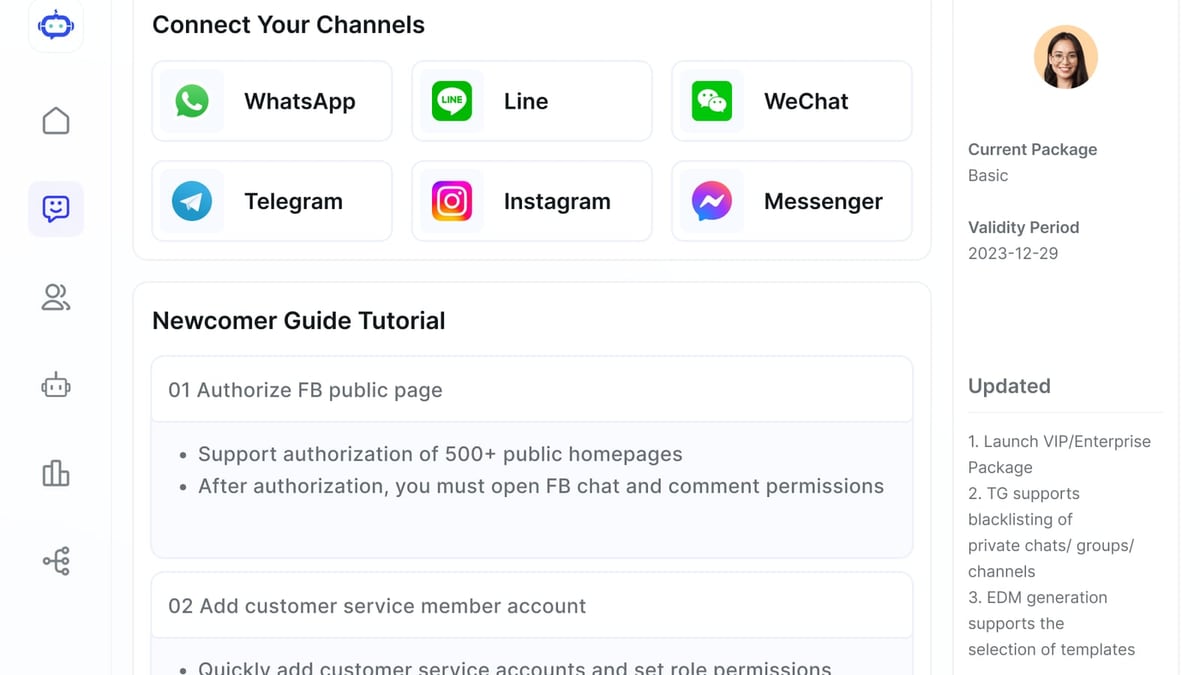
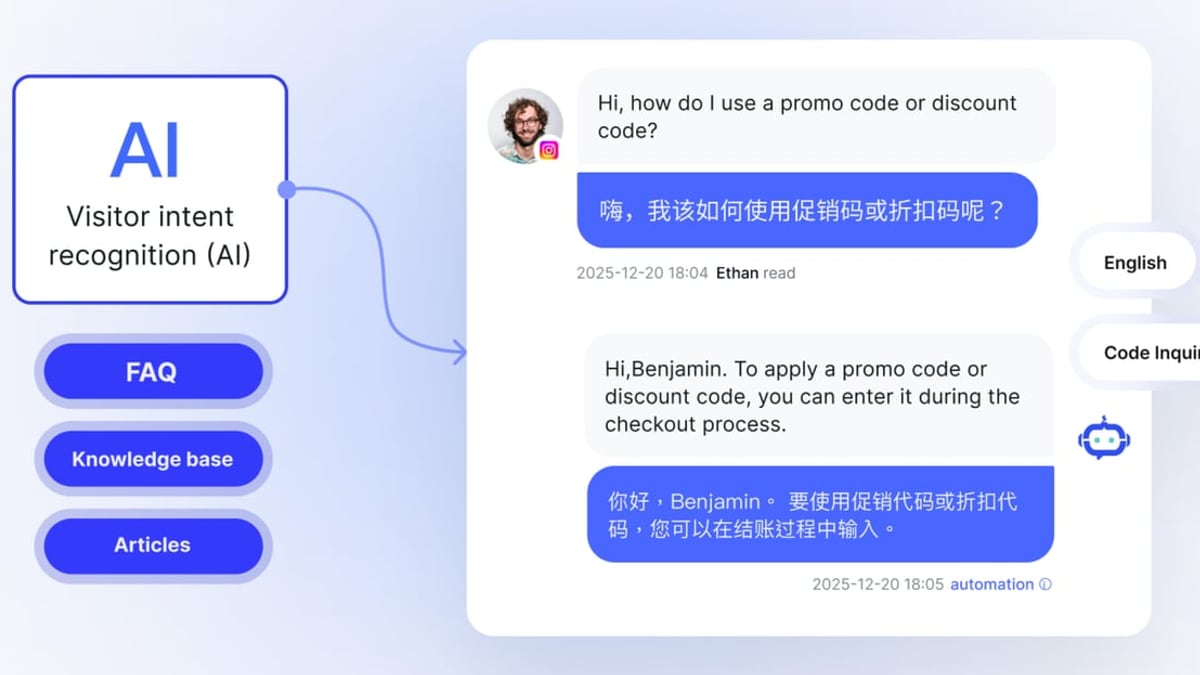
The platforms above excel at internal collaboration. But many teams also manage customer interactions across multiple channels. For cross-border sales and support teams, adding a dedicated omnichannel customer engagement system can close the gap. SaleSmartly consolidates messages from WhatsApp, Facebook Messenger, Instagram, Telegram, and more into a single AI-powered inbox. It provides AI agents that think and act independently, real-time translation in 134 languages, and automation flows that trigger based on customer behavior. While SaleSmartly is not a team project management tool, it complements platforms like Slack by handling the external conversation layer—letting your team stay productive on collaboration tools while AI manages customer routing and initial replies. For deeper CRM integration, explore our Top 10 CRM Software 2026 guide.
Related reading
- SleekFlow Review 2026: Features, Pricing & Honest Verdict - In-depth SleekFlow review: Explore features, pricing, pros & cons, setup, and real user ratings. See if this AI conversational commerce platform fits your business.
- How to Use SaleSmartly with Ringly: Omnichannel AI Setup - Combine SaleSmartly's omnichannel messaging with Ringly's AI phone support for Shopify to handle calls and chats 24/7. Step-by-step integration guide.
Sources and further reading
- 12 AI Collaboration Tools for Innovative Teams (2026) - Compare the 12 best AI collaboration tools of 2026 — AI memory, project management, and meeting AI — with features, pros, cons, and how to choose.
- What are the Big 5 in AI? - Artificial Intelligence (AI) has rapidly transformed the business landscape, becoming a critical component in modern strategies designed to enhance efficiency and decision-making. Within this broad spectrum, there are five key players, often referred to as the “Big 5” in AI. Understanding these companies is essential for anyone interested in harnessing the power of AI for […]
FAQ
What is an AI-powered team collaboration platform?
It’s a digital workspace that uses artificial intelligence to automate tasks, generate content summaries, predict project risks, and enhance communication—all within a shared environment where teams plan, chat, and store knowledge.
Can these platforms actually improve productivity?
Yes. Real-world metrics include a 37% productivity gain with Slack huddles, a 51% reduction in meetings with async clips, and significantly fewer missed deadlines thanks to AI risk alerts in platforms like Monday.com and Wrike.
Do any of these tools offer free plans?
All listed platforms provide a free tier or trial, making it easy to test AI features before committing. Paid plans generally start between $4 and $11 per user per month.
Which AI collaboration tool is best for remote teams?
Slack and Microsoft Teams lead for communication, while Monday.com, ClickUp, and Notion excel at asynchronous project tracking and knowledge management. The best choice depends on whether your bottleneck is real-time conversation or structured work coordination.
Conclusion
AI has moved from novelty to necessity in team collaboration. The 2026 landscape offers a platform for every work style—from visual whiteboards to predictive project management. By matching AI capabilities to how your team actually works, you’ll reduce context switching, surface insights faster, and free everyone to concentrate on high-value tasks. Start with a pilot, measure the impact, and iterate. For more side-by-side comparisons and expert buying guides, explore our resource hub at SaleSmartly.