
How to Use SaleSmartly with Lazada: A Unified Customer Service Guide
Running a successful Lazada store means more than just listing products. You’re juggling messages from Lazada’s built-in chat, Facebook Messenger, Instagram, WhatsApp, and maybe even LINE or Telegram. For cross‑border sellers, language barriers turn a three‑minute reply into a fifteen‑minute translation marathon. The result: missed sales, frustrated customers, and an overwhelmed team.
SaleSmartly and Lazada together solve that. SaleSmartly acts as the intelligent communication layer that unifies every customer touchpoint, while Lazada remains your sales engine. You don’t replace Lazada’s ecosystem—you supercharge it with cross‑channel messaging, AI automation, and real‑time translation. Here’s how to set it up and why the combination works so well.
Why Lazada Sellers Need a Unified Communication Hub

How to Use SaleSmartly with Lazada: A Unified Customer Service Guide product interface and feature overview.
Lazada gives you massive exposure, but its native messaging is stuck inside the platform. Customers often switch channels mid‑conversation—they discover your product on Lazada, ask a quick question on Facebook, then finalize details over WhatsApp. If your team toggles between three different apps, messages slip through, response times spike, and potential buyers abandon their carts.
SaleSmartly eliminates that chaos. It aggregates conversations from 10+ channels—including Facebook Messenger, Instagram, WhatsApp, LINE, WeChat, Telegram, and email—into a single interface. While it doesn’t plug directly into Lazada’s private chat API, you can still channel Lazada interactions into SaleSmartly by:
- Adding SaleSmartly’s live chat widget to your own website (if you drive Lazada customers there for after‑sales support).
- Routing Lazada order‑related queries to WhatsApp or Facebook, where SaleSmartly captures them automatically.
- Using SaleSmartly’s email channel to handle any Lazada seller‑center notifications or buyer emails.
This approach gives you one dashboard to monitor, reply, and automate every message, regardless of where the customer started.
Step‑by‑Step: Integrating SaleSmartly with Your Lazada Workflow

How to Use SaleSmartly with Lazada: A Unified Customer Service Guide product interface and feature overview.
1. Map All Your Customer Communication Channels
Before touching settings, list every channel your Lazada customers actually use. A typical Southeast Asian seller might have:
- Lazada Chat (on‑platform)
- Facebook Page messages
- Instagram DMs
- WhatsApp Business
- LINE official account (Thailand)
- Zalo (Vietnam)
- Email (order confirmations, return requests)
SaleSmartly acts as a unified inbox for most of these, so note which ones you’ll connect.
2. Connect Channels to SaleSmartly
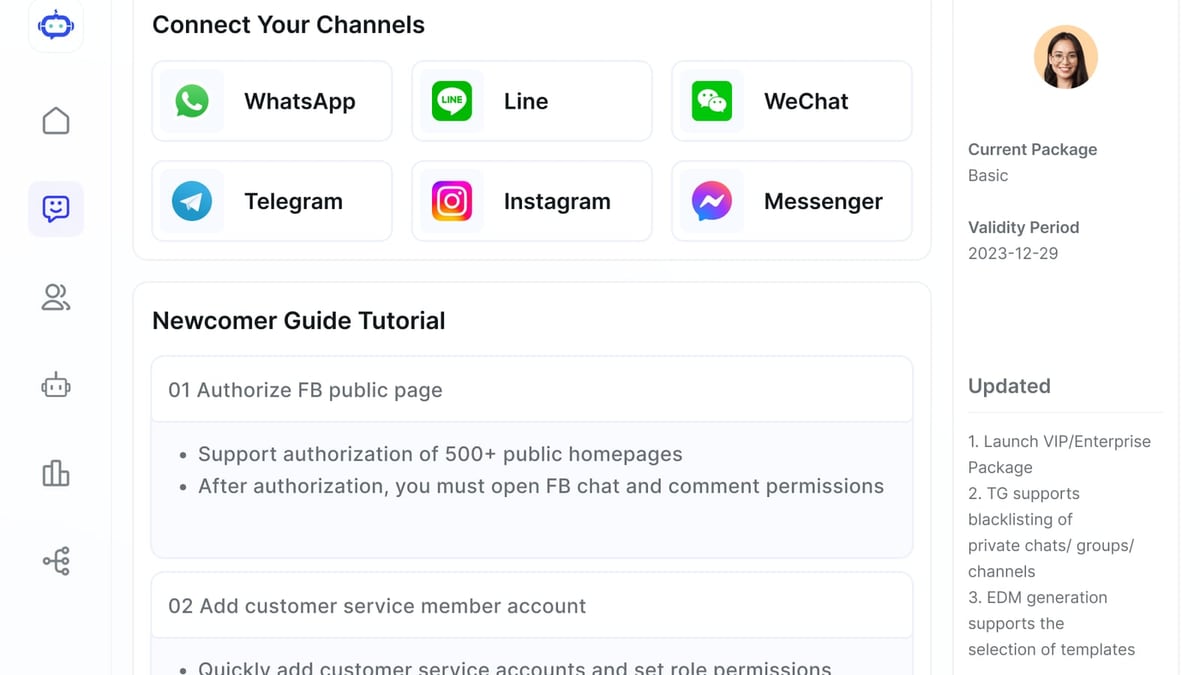
Log into your SaleSmartly account, go to Channel Settings, and add each supported platform. The setup varies slightly per channel, but generally you authorize SaleSmartly to access your Facebook Page, WhatsApp Business API, Instagram Professional account, LINE, Telegram, or others. The process takes a few minutes per channel, and you can start getting messages immediately.
For any native Lazada messages that cannot be ingested directly, consider setting up an auto‑reply on Lazada Chat that directs urgent conversations to WhatsApp. Something like: “For instant support, message us on WhatsApp at [number].” Then SaleSmartly seamlessly picks up those WhatsApp messages inside the same unified inbox.
3. Set Up a Smart, Unified Inbox
Inside SaleSmartly, all conversations funnel into one real‑time feed. Use Auto‑Assignment Rules to distribute chats to specific team members based on language, channel, or keyword. For example:
- Thai‑language chats → Thai‑speaking agent
- Messages containing “refund” or “return” → senior support
- Facebook & Instagram → social media team
This prevents the chaos of two agents answering the same question and ensures every message gets a qualified reply within seconds.
4. Build an AI Chatbot for Common Lazada Questions
Lazada buyers ask the same set of pre‑purchase and post‑purchase questions hundreds of times a day: “Is this in stock?” “When will my order arrive?” “How do I return this?”
SaleSmartly’s AI Agent lets you create a chatbot that answers these automatically. You can feed it:
- Your return policy
- Shipping timelines per region
- Product FAQs
- Promotion details during Lazada campaigns like 11.11 or payday sales
The AI agent understands context, won’t give stale answers, and seamlessly hands off to a human when the query becomes complex. During high‑traffic sale events, this alone can cut response times from hours to seconds.
5. Activate Real‑Time Translation (Game‑Changer for Cross‑Border Sellers)
Many Lazada sellers ship to multiple countries—Indonesia, Malaysia, the Philippines, Thailand, Singapore, Vietnam. Customers message you in Bahasa Indonesia, Thai, Vietnamese, or Tagalog. Without translation, you either hire native speakers for each language (expensive) or rely on copy‑paste from Google Translate (slow and error‑prone).
SaleSmartly’s built‑in translation works in both directions across 134 languages. When an Indonesian buyer types “Berapa harga ongkir ke Jakarta?” your agent sees the message instantly translated into English. The agent replies in English, and SaleSmartly sends the translated Indonesian version back to the customer. The conversation feels native, but your team operates in one language. This feature alone can unlock sales that would otherwise be lost to language friction.
6. Use CRM Profiles to Personalize Every Interaction
SaleSmartly automatically builds a customer profile for each contact, showing:
- All past conversations across channels
- Tags you assign (e.g., “VIP buyer,” “frequent returner”)
- Their browsing behavior if you use SaleSmartly’s live chat on your site
- Contact details and conversation history
When a repeat buyer from Lazada reaches out on WhatsApp, your agent instantly sees that they ordered three times before and always ask about discounts. You can then offer a personalized loyalty code without them having to explain anything.
7. Analyze Performance and Optimize
SaleSmartly’s analytics dashboard shows you metrics that matter: first‑response time, resolution speed, agent workload, customer satisfaction, and channel‑wise conversation volume. For a Lazada seller, this data is pure gold. You might discover that 60% of your support messages come through Facebook after a Lazada promo, meaning you need to staff that channel more aggressively during campaigns. Or you might find that WhatsApp conversations convert twice as often as platform chat—so you start routing more Lazada buyers to WhatsApp.
Practical Examples: SaleSmartly + Lazada in Action
How to Use SaleSmartly with Lazada: A Unified Customer Service Guide product interface and feature overview.
Case 1: The Thai Electronics Seller
Somsak sells smartphones and accessories exclusively on Lazada Thailand. He runs Facebook ads that drive buyers to his Lazada store, but most after‑sales questions land on his LINE account and Facebook Messenger. Before SaleSmartly, he’d miss messages because he was only monitoring Lazada Chat. Now, with LINE, Messenger, and Instagram connected to SaleSmartly, he and his two part‑time staff handle everything from one app. When a customer messages on LINE in Thai about a delayed shipment, SaleSmartly auto‑translates to English for Somsak, and his reply is translated back. His average response time dropped from 3 hours to under 15 minutes, and his positive seller rating climbed.
Case 2: Cross‑Border Fashion Brand
A Vietnamese clothing brand sells across Lazada Singapore, Malaysia, and the Philippines. They use SaleSmartly to manage Facebook, Instagram, WhatsApp, and email. During a Lazada mid‑month sale, they triggered their AI chatbot to answer “What’s my size?” and “How long does shipping take?” automatically. The bot handled 70% of incoming messages, leaving the human agents free to close sales and negotiate bulk orders. Real‑time translation let them serve English‑, Malay‑, and Tagalog‑speaking buyers from a single Vietnamese‑speaking team.
Case 3: Sourcing Products from Lazada and Selling Elsewhere
Some savvy entrepreneurs don’t just sell on Lazada—they use Lazada as a product research and sourcing platform, then sell on Facebook, Instagram, or WhatsApp using the “chat‑selling” model. As the SaleSmartly blog explains, you can find trending Lazada products, repurpose them on social media, and manage all buyer chats through SaleSmartly’s unified inbox. This approach turns Lazada into a product discovery engine and SaleSmartly into the sales closing machine.
Related reading
- Zendesk Review 2026: AI-Powered Customer Service That Delivers Real Resolutions - In-depth Zendesk review: AI resolution capabilities, omnichannel support, pricing, user sentiment, and when to choose it. See real pros, cons, and decision criteria for 2026.
- Top 10 Email and SMS Marketing Platforms 2026 - Discover the 10 best email and SMS marketing platforms for 2026. We compare Omnisend, Klaviyo, Mailchimp & more on automation, deliverability and pricing.
Sources and further reading
- Salesmartly | LinkedIn - Salesmartly | 24 followers on LinkedIn. Best AI-powered Omnichannel Engagement Platform | Salesmartly is a powerful omnichannel customer service platform packed with smart features and effective AI integration. The platform unifies sales, marketing, and customer service by managing conversation from all business channels — Zalo, TikTok, Facebook, Instagram, and more. You can stay connected anytime, anywhere, whether on desktop, IOS & Android Devices.
- (PH) ASC e-com services TC - GENERAL TERMS AND CONDITIONS (LAZADA SPONSORED SOLUTIONS)
FAQ: SaleSmartly and Lazada
Does SaleSmartly integrate directly with Lazada Chat?
Currently, there is no official API integration that pulls Lazada’s internal chat into SaleSmartly. However, you can work around this by directing Lazada conversations to supported channels like WhatsApp or Facebook Messenger, where SaleSmartly captures them in your unified inbox. Many sellers also use SaleSmartly’s email channel to manage any Lazada email notifications.
Can I use SaleSmartly to send automated order updates to Lazada buyers?
Yes. If a Lazada buyer contacts you on WhatsApp or Facebook after a purchase, SaleSmartly’s AI agent can automatically provide tracking information, estimated delivery dates, or return steps based on the order details you upload into the system. It can even send proactive re‑order reminders or thank‑you messages—turning one‑time buyers into repeat customers.
How does real‑time translation actually improve Lazada sales?
When a buyer messages you in their native language (e.g., Thai, Vietnamese, or Tagalog) and receives an instant, accurate reply in the same language, their trust skyrockets. They’re less likely to abandon the chat and more likely to complete the purchase. Data shows that multilingual support can boost cross‑border conversion rates by up to 30%, and SaleSmartly’s seamless translation eliminates the cost of hiring a multilingual support team.
What’s the cost of using SaleSmartly for a small Lazada store?
SaleSmartly offers a free tier that includes basic channels and a limited number of AI bot interactions. Paid plans scale with your volume, but even the entry‑level paid plan often pays for itself by reducing the need for extra staff and recapturing abandoned conversations. For a detailed comparison with other platforms, check out our SaleSmartly vs Respond.io vs Zendesk breakdown or the SaleSmartly vs LiveChat comparison.
Why This Combination Wins

How to Use SaleSmartly with Lazada: A Unified Customer Service Guide product interface and feature overview.
Lazada gives you the marketplace, the logistics, and the traffic. SaleSmartly gives you the conversational nerve center to turn that traffic into loyal customers. You stop losing messages, slash response times, and break language barriers—all without hiring a multilingual contact center. Whether you’re a solo seller in Indonesia or a cross‑border brand, pairing SaleSmartly with Lazada is one of the smartest operations moves you can make.
Ready to unify your customer messaging? Start a free SaleSmartly trial and see how many more conversations you can close today. And for more tool comparisons that help e‑commerce sellers pick the right stack, visit SaleSmartly.