
How to Use SaleSmartly with Meta for Business
Meta for Business is the engine that brings potential customers to your doorstep through highly targeted ads on Facebook, Instagram, Messenger, and WhatsApp. But what happens once they click "Send Message"? Without a smart, unified system to handle those conversations, you risk losing leads, frustrating buyers, and missing sales. SaleSmartly closes that gap. By connecting SaleSmartly's omnichannel AI customer service platform with your Meta ad ecosystem, you can automatically respond to inquiries across all Meta channels 24/7, nurture leads with personalized follow‑ups, and turn casual chatters into paying customers—all from a single dashboard.
This guide walks you through exactly how to combine SaleSmartly with Meta for Business, with actionable setup steps, real‑world examples, and a clear comparison to Meta’s native AI tools.
Why Combine SaleSmartly and Meta for Business?

How to Use SaleSmartly with Meta for Business (Step-by-Step) product interface and feature overview.
Running Click‑to‑Messenger or Click‑to‑WhatsApp ads is one of the most effective ways to lower cost‑per‑conversion and build direct relationships with shoppers. However, the influx of messages can quickly overwhelm your team if every chat lands in a separate app and requires manual replies. Here’s what SaleSmartly brings to the table:
- Unified omnichannel inbox – Manage Facebook Messenger, Instagram DMs, and WhatsApp chats alongside email, Telegram, LINE, and other channels in one place, so no lead gets lost.
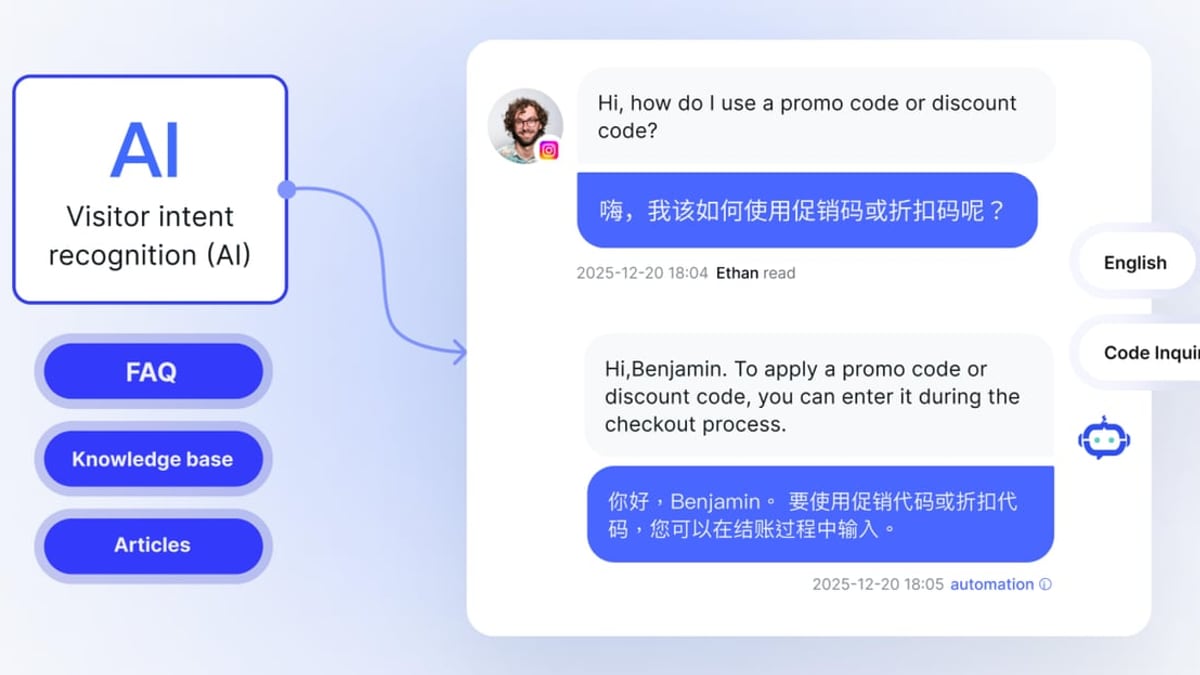
- AI‑powered auto‑replies – SaleSmartly’s LLM‑based AI agents instantly answer product questions, check order status, qualify leads, and even complete purchases inside the chat, working 24/7 in 134 languages.
- Deep CRM and analytics – Build customer profiles enriched with browsing history, tags, and past conversations; then measure exactly how many ad‑initiated chats convert into sales.
- Scalable team collaboration – Route chats to the right agent, set up shift‑based assignments, and maintain quality with internal notes and conversation reviews.
Meta’s native Business Agent (covered in Meta’s help guide) can handle basic conversations on Messenger and WhatsApp, but it’s limited to Meta’s ecosystem, lacks the depth of a true CRM, and doesn’t extend to other channels. For businesses that want advanced automation and a unified view of every customer interaction, combining SaleSmartly with Meta for Business is the smarter path.
What You Need Before Starting
How to Use SaleSmartly with Meta for Business (Step-by-Step) product interface and feature overview.
- A Meta for Business account with a connected Facebook Page, Instagram Professional account, and/or WhatsApp Business API number.
- An active SaleSmartly subscription (free trial available).
- Ad account with a valid payment method and at least one campaign configured to send traffic to Messenger or WhatsApp.
- Product catalog (optional but recommended) – helps AI agents recommend items from your inventory.
Step‑by‑Step: Integrating SaleSmartly with Meta for Business
How to Use SaleSmartly with Meta for Business (Step-by-Step) product interface and feature overview.
1. Connect Your Meta Channels to SaleSmartly
Start by bringing all your Meta messaging endpoints into the SaleSmartly dashboard.
- Log in to SaleSmartly and navigate to Settings → Channel Management.
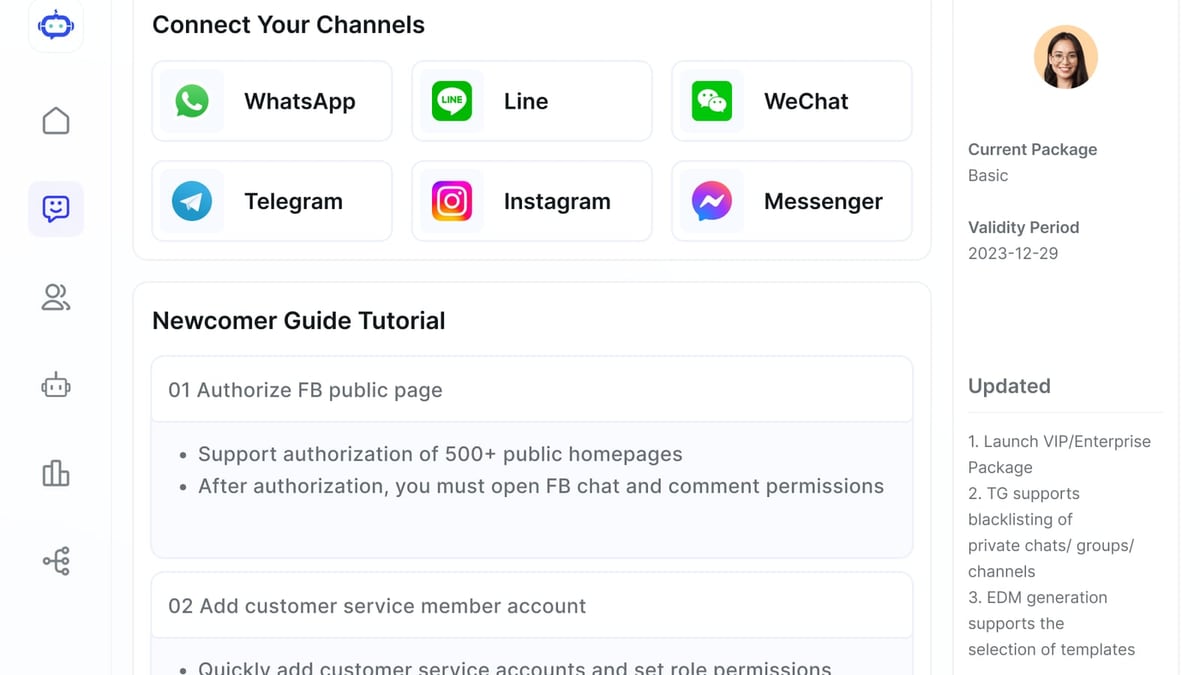
- Click Add Channel and choose Facebook Messenger. Authorize the integration by logging into your Facebook account and granting permissions for the desired Page. Repeat the same process for Instagram (using an Instagram Professional account linked to the Page).
- To add WhatsApp, select WhatsApp Business API. You can either connect an existing WhatsApp Business API number through a provider or use SaleSmartly’s embedded application process. Follow the on‑screen steps to verify your business and phone number.
Once connected, all existing and future messages from those Meta channels will flow into your unified SaleSmartly inbox. You can reply to customers directly from the interface without ever switching apps.
2. Create Click‑to‑Messenger or Click‑to‑WhatsApp Ads in Meta Ads Manager
Your ads will drive customers directly to a chat conversation—Salesmartly doesn’t alter the ad creation process, it only takes over the conversation after the click.
- Go to Meta Ads Manager and create a new campaign with the objective Engagement or Sales (depending on your funnel).
- In the ad set, under Destination, select Messenger or WhatsApp. Set your targeting, budget, and placements.
- Design your ad creative with a clear “Send Message” call‑to‑action. Use quick‑reply buttons or a welcome message to start the conversation smoothly.
- Publish the ad. Meta for Business will now drive users directly into the chat channel you connected to SaleSmartly.
3. Configure SaleSmartly’s AI Agent and Automation Rules
Now the real magic happens. SaleSmartly’s AI agent will greet each new conversation, answer questions, and route complex issues to your human team.
- In SaleSmartly, go to Automation → AI Agent. Choose a pre‑built template for “Click‑to‑Message” or create a custom flow.
- Define the AI’s behavior: upload your FAQ document, input product descriptions, set prompt instructions (e.g., “be friendly, speak in English, never promise same‑day delivery”).
- Set up trigger rules such as: “When a new conversation comes from Facebook Messenger, first send a welcome message, then engage the AI agent.” You can also use SaleSmartly’s visual chatbot builder to map out decision trees if you prefer a more structured flow.
- Enable automatic translation if you receive messages in multiple languages. SaleSmartly will detect the customer’s language and reply in the same language—essential for cross‑border commerce.
- Under Assignment Rules, define when and how conversations should be handed off to human agents. For example, “If the customer asks for a refund, route to the support team,” or “If the lead score is high, assign to a senior sales agent.”
4. Unify Your Inbox and Set Up Team Collaboration
With channels connected and automation running, your team can now manage everything in one place.
- Use the Shared Inbox to view all Meta‑originated chats together with emails, website chats, and other platform messages.
- Activate Real‑time Translation (134 languages) so that even a single agent can serve customers from different countries without language barriers.
- Assign roles and permissions to control who can see specific channels or conversations. Use chat tags and customer profiles to track lead stages.
- Leverage the internal Notes & Mentions feature to collaborate on tricky tickets without leaving the chat.
5. Monitor Performance and Optimize
Salesmartly’s analytics dashboard gives you a direct view of how well your Meta ad chats are converting.
- Navigate to Analytics in SaleSmartly to see key metrics per channel: average first‑response time, resolution time, customer satisfaction, and the number of chats that led to a purchase.
- Tie SaleSmartly conversation data back to your Meta Ads Manager by using optional offline conversion tracking. For example, you can record a conversion in Meta when a chat in SaleSmartly is marked “Sale Closed,” giving you true cost‑per‑acquisition of your Click‑to‑Message campaigns.
- Use the insights to refine your AI agent’s answers, adjust assignment rules, and A/B test greeting messages.
Practical Example: E‑Commerce Brand Automating Click‑to‑WhatsApp Ads
Consider a cross‑border fashion brand running Facebook and Instagram ads that open a WhatsApp chat. Before integrating SaleSmartly, three customer‑support agents spent hours manually answering common questions about sizing charts, shipping times, and returns policies in English, Spanish, and French. Response times often exceeded 10 minutes, leading to abandoned chats and lost sales.
After connecting WhatsApp to SaleSmartly, the brand:
- Uploaded their product catalog, size guides, and shipping policies to SaleSmartly’s AI knowledge base.
- Set up an AI agent that automatically greets each WhatsApp user in their detected language, answers up to 80% of routine questions, and pushes high‑intent leads (e.g., “I want to buy now”) directly to a human agent with a prefilled customer profile.
- Enabled real‑time translation so each agent could serve all languages from one queue.
Result: First‑response time dropped to under 5 seconds, chat‑to‑sale conversion rate increased by 34%, and the support team now handles 2× the number of chats without adding headcount.
SaleSmartly vs. Meta Business Agent: Which One Should You Use?

How to Use SaleSmartly with Meta for Business (Step-by-Step) product interface and feature overview.
Meta’s own Business Agent is a simple AI that can answer common questions on Messenger and WhatsApp using your Page info and product catalog. It’s a decent entry point, but it has clear limitations when compared with SaleSmartly:
| Capability | Meta Business Agent | SaleSmartly |
|---|---|---|
| Channels supported | Messenger, WhatsApp only | WhatsApp, Messenger, Instagram, Telegram, LINE, WeChat, email, website chat, and more |
| AI sophistication | Basic Q&A based on existing business assets | Open LLM‑based agent that can reason, execute tasks, and learn from custom documents |
| Language support | Limited to Meta’s built‑in language models | 134 languages with real‑time translation |
| Team management | None (handled through Meta Business Suite inbox) | Role‑based access, shift assignment, internal notes, quality reviews |
| CRM & tracking | Minimal (only conversation history within Meta) | Full customer profiles, tags, browsing records, and conversion analytics |
| Pricing | Free (limited) | Unlimited contacts with transparent per‑agent pricing (see our SaleSmartly vs Respond.io comparison) |
Decision guidance: If you only need a lightweight auto‑reply bot on Messenger and WhatsApp, and you don’t handle other channels or require advanced reporting, Meta Business Agent may be enough. But from the moment you want to unify Meta’s messaging with Instagram DMs, email, or live chat, or you need a multilingual AI that can actually close sales (not just answer questions), SaleSmartly is the superior choice. For most businesses running Click‑to‑Message ads at scale, the cost of an extra tool quickly pays for itself through higher conversion rates.
Related reading
- SaleSmartly vs LiveChat vs Respond.io: 2026 Comparison - Compare SaleSmartly, LiveChat, and Respond.io on channels, AI agents, pricing, and CRM. Find which AI-powered customer conversation platform fits your business needs.
- SaleSmartly vs Respond.io: Open AI & Unlimited Contacts Win - Compare SaleSmartly vs Respond.io: discover why SaleSmartly's open AI agents, unlimited contacts pricing, and 134-language translation outperform Respond.io's contact-based fees and closed ecosystem.
- Mailchimp Review 2025: Features, Pricing & Honest Verdict - Unbiased Mailchimp review: pricing, pros & cons, AI features, alternatives. See if Mailchimp's email marketing platform is right for your ecommerce or small business.
Sources and further reading
- Meta AI for Business: How to Use It in 2026 - Learn how Meta AI for Business can transform your operations, improve efficiency, and drive growth in 2026 with practical tips and strategies.
- How to Contact a Meta Representative for Help - LinkedIn - 𝐇𝐚𝐯𝐞 𝐲𝐨𝐮 𝐛𝐞𝐞𝐧 𝐬𝐭𝐫𝐮𝐠𝐠𝐥𝐢𝐧𝐠 𝐭𝐨 𝐠𝐞𝐭 𝐢𝐧 𝐭𝐨𝐮𝐜𝐡 𝐰𝐢𝐭𝐡 𝐚 𝐦𝐞𝐭𝐚 𝐫𝐞𝐩𝐫𝐞𝐬𝐞𝐧𝐭𝐚𝐭𝐢𝐯𝐞 𝐨𝐧 𝐚 𝐜𝐚𝐥𝐥? 𝐋𝐞𝐭 𝐦𝐞 𝐬𝐨𝐫𝐭 𝐭𝐡𝐢𝐬 𝐨𝐧𝐞 𝐨𝐮𝐭 𝐟𝐨𝐫 𝐲𝐨𝐮!
Most founders and marketers don’t have a “Meta rep on speed dial.” But you can reliably speak to a meta representative if you know the right doors to knock on.
𝟏) 𝐈𝐟 𝐲𝐨𝐮 𝐚𝐫𝐞 𝐚 𝐂𝐫𝐞𝐚𝐭𝐨𝐫 (𝐛𝐥𝐮𝐞 𝐭𝐢𝐜𝐤 / 𝐌𝐞𝐭𝐚 𝐕𝐞𝐫𝐢𝐟𝐢𝐞𝐝) Open Instagram → Settings & privacy → Accounts Center Tap Meta Verified → Get support → Open chat Share your issue (ad disapprovals, account restriction, billing, shadowed delivery, etc.). A Meta support agent typically calls or chats back promptly via the in-app support thread.
𝟐) 𝐈𝐟 𝐲𝐨𝐮’𝐫𝐞 𝐚 𝐁𝐮𝐬𝐢𝐧𝐞𝐬𝐬/𝐀𝐝𝐯𝐞𝐫𝐭𝐢𝐬𝐞𝐫 Log in to Business Manager / Ads Manager. Click Help (bottom-left) → Contact support. If eligible, you’ll see Chat with a representative or Email support.
If there are no chat option for you? Here are the steps you can follow: Raise a ticket via the Meta Business Help Center (Support > Create Case). Ensure active ad spend and a valid payment method, chat access often prioritizes accounts actively spending. So next time someone tells you, It’s impossible to get in touch with a Meta representative, You’ll know exactly what needs to be done! | 10 comments on LinkedIn
Frequently Asked Questions
Can I use SaleSmartly with Instagram Direct Messages and Facebook comments?
Yes. Once you connect an Instagram Professional account, all new DMs and comment replies appear in your SaleSmartly inbox. You can even automate responses to specific comment triggers using SaleSmartly’s rule engine.
Does SaleSmartly work with the WhatsApp Business API, or only the regular app?
It supports the WhatsApp Business API, which is required for automated messaging and high‑volume handling. If you’re currently using the WhatsApp Business mobile app, you’ll need to migrate to the API (Salesmartly can guide you through the process).
How does the AI handle multiple languages from Meta ads?
SaleSmartly automatically detects the customer’s language in the chat and responds in the same language, using a combination of built‑in translation and multilingual AI prompts. This works seamlessly for all Meta channels.
Will integrating SaleSmartly slow down my Meta ads or affect delivery?
No. SaleSmartly operates at the conversation level, not the ad‑delivery level. Your Meta ads continue to run as normal; SaleSmartly simply acts as the reception desk when customers click “Send Message.”
Turn Meta Ads into Conversations That Convert
Meta for Business is unmatched for reaching the right audience at the right moment. SaleSmartly makes sure every click that turns into a chat gets the instant, intelligent response it deserves—whether it’s a simple “What size is this?” or a complex B2B inquiry. By connecting the two, you create an end‑to‑end funnel that captures leads, automates engagement, and scales your customer support without losing the human touch.
Ready to see the combination in action? Explore SaleSmartly’s features and start your free integration today. For more on how SaleSmartly stacks up against other platforms that work with Meta, check out our SaleSmartly vs LiveChat vs Respond.io comparison.