
How to Use SaleSmartly with WhatsApp for Omnichannel Customer Service
WhatsApp powers conversations for over 3 billion users worldwide, yet many businesses still treat it as a standalone channel. Without a shared workspace, teams juggle multiple apps, lose context, and can’t scale quick, personalized support. SaleSmartly changes that—it brings WhatsApp into a unified omnichannel command center, layered with AI agents, real-time translation, and smart automation.
This guide walks through exactly how to connect SaleSmartly with WhatsApp, the problems this combination solves, and practical ways cross-border teams are already using the duo to close more deals and keep customers happy.
Why Combine SaleSmartly and WhatsApp?

How to Use SaleSmartly with WhatsApp: A Step-by-Step Integration Guide product interface and feature overview.
Running WhatsApp support from the everyday messaging app creates friction fast:
- Conversations scatter across personal devices and spreadsheets.
- Multilingual customers hit a wall when agents speak only one language.
- 82% of users expect an instant response—yet after-hours queries go silent.
- Manual follow‑ups for abandoned carts, lead qualification, or order updates eat agent time.
SaleSmartly solves these in one place:
- Single inbox for all channels – WhatsApp, Facebook Messenger, Instagram, email, Telegram, LINE, and more flow into one dashboard.
- AI‑powered first response – An always‑on chatbot handles FAQs, qualifies leads, and hands over complex issues to the right human agent.
- 134‑language real‑time translation – Every message is automatically translated into the agent’s language and back to the customer’s language. No more language silos.
- No‑code automation – Build sequences for welcome messages, off‑hours auto‑replies, payment reminders, or drip campaigns across channels.
- CRM rich insights – Track each customer’s journey, previous chats, tags, and browsing history without switching tools.
If you’re comparing platforms built around WhatsApp, our SaleSmartly vs Wati vs Zendesk analysis shows how an omnichannel hub stacks up against WhatsApp‑first tools.
How SaleSmartly and WhatsApp Work Together
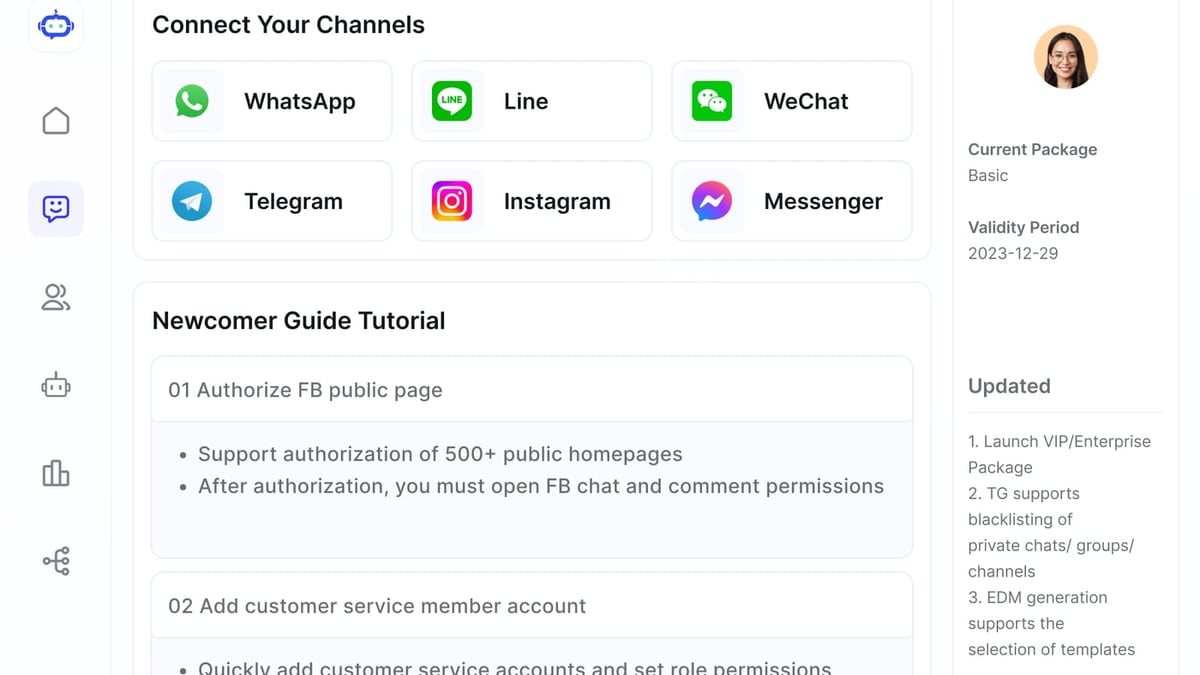
How to Use SaleSmartly with WhatsApp: A Step-by-Step Integration Guide product interface and feature overview.
Behind the scenes, SaleSmartly connects to WhatsApp via the WhatsApp Business API . Unlike the personal or small‑business app, the API allows multiple agents to manage one number, integrate chatbots, and send structured messages at scale.
Once linked, SaleSmartly acts as the operating system:
- Ingest – Every incoming WhatsApp message appears alongside conversations from Instagram, email, and other channels inside a unified ticket panel.
- Analyze – SaleSmartly’s AI agent (powered by large language models) interprets the intent, identifies language, and checks customer history.
- Respond – If it’s a routine question, the AI replies instantly, following brand tone and business rules. If the query needs human empathy, it routes to the appropriate team with a full context summary.
- Translate – For cross‑border teams, both sides see messages in their own language. An agent in Tokyo can answer a customer in São Paulo as if they’re speaking the same native tongue.
- Automate – Behind‑the‑scenes, SaleSmartly can trigger actions: update a CRM tag, send a post‑purchase survey after delivery, or nudge a customer who abandoned a cart.
Step-by-Step: How to Set Up WhatsApp in SaleSmartly

How to Use SaleSmartly with WhatsApp: A Step-by-Step Integration Guide product interface and feature overview.
Before you begin, you’ll need a Meta Business Manager account and a verified WhatsApp Business API phone number. SaleSmartly’s setup wizard streamlines the process—no developer required in most cases.
Step 1: Prepare Your WhatsApp Business API Access
If you don’t yet have API access, create a Meta Business Account and register a WhatsApp Business profile. You can do this through Meta’s own onboarding or via a Solution Partner. SaleSmartly itself offers embedded activation, guiding you through:
- Creating a WhatsApp Business app in Meta for Developers.
- Setting up a permanent access token.
- Linking your business phone number ID.
Once you have the phone number ID and token, keep them ready.
Step 2: Add WhatsApp as a Channel in SaleSmartly
Log in to your SaleSmartly dashboard and go to Settings > Channels > Add Channel > WhatsApp. Fill in the required fields—typically your WhatsApp Business phone number ID and access token. The system verifies the connection, and within minutes your WhatsApp number appears as an active channel.
Step 3: Configure the AI Agent and Automation Flows
Now the real power comes online:
- Enable the AI Agent – Under your WhatsApp channel settings, turn on the AI assistant. You can train it with FAQs, product sheets, or leave it to handle general inquiries. Set a fallback rule so that if confidence is low, the conversation moves to a human agent.
- Design automation flows – Use SaleSmartly’s no‑code flow builder to create scenarios. For example:
- Welcome message: “Hi! How can we help you today? Ask me about shipping, returns, or product details.”
- Off‑hours auto‑reply: “We’re currently offline. We’ll get back to you within 2 hours. In the meantime, I can answer common questions.”
- Lead qualification: Ask industry, company size, and need, then tag and route to sales.
Step 4: Set Up Team Routing and Real‑Time Translation
Assign agents to the WhatsApp queue. Create rules to route conversations by language, customer segment, or inquiry type. Then activate the translation engine:
- Navigate to Settings > Translation and enable automatic translation.
- Choose your agents’ native language(s). When a WhatsApp message arrives in French, the agent sees it in English; their reply is automatically translated back to French.
Step 5: Explore Advanced Integrations and Analytics
Connect your CRM (like HubSpot or a custom API) so that every WhatsApp interaction enriches customer profiles. Turn on analytics dashboards to monitor first‑response time, resolution rates, and CSAT scores specifically for WhatsApp traffic.
For a deeper look at integrating AI engines, see our step‑by‑step guide on using SaleSmartly with IBM watsonx to extend automation capabilities.
Practical Examples: SaleSmartly + WhatsApp in Action
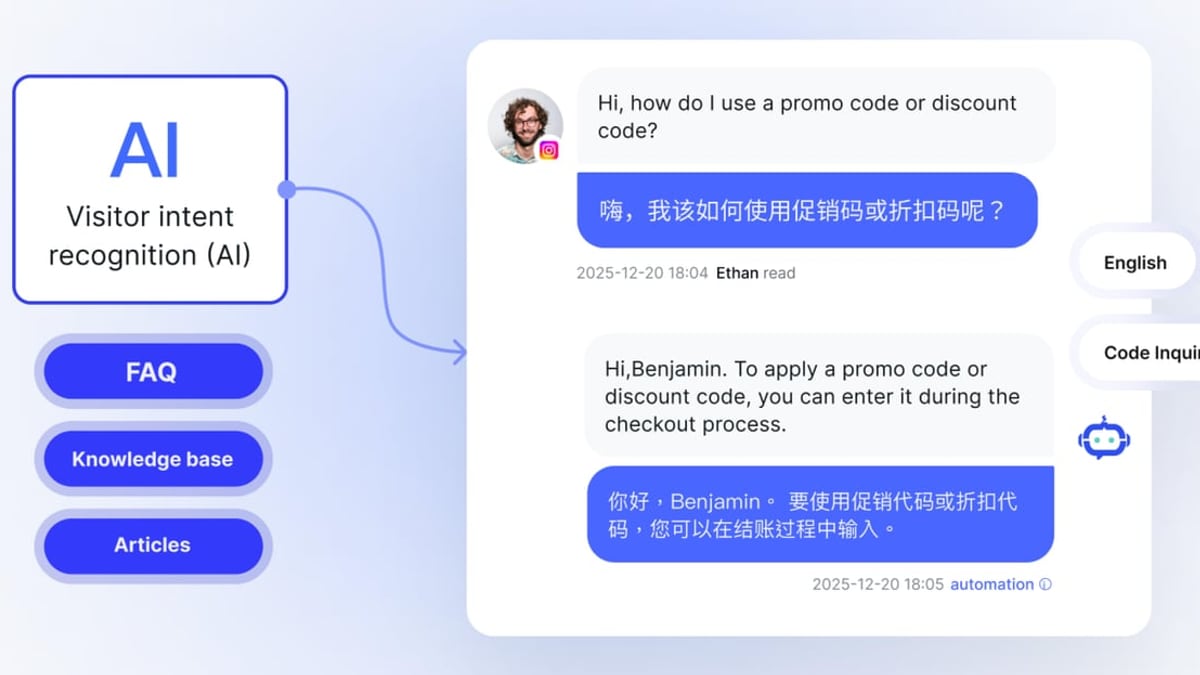
How to Use SaleSmartly with WhatsApp: A Step-by-Step Integration Guide product interface and feature overview.
1. Cross‑Border Ecommerce Customer Support
A Spanish‑speaking shopper messages your Singapore‑based gadget store on WhatsApp about a laptop’s specs. SaleSmartly’s AI immediately answers in Spanish with the details and availability, pulling from your product database. The shopper asks a more complex warranty question; the AI hands off to a Chinese‑speaking agent who sees the full chat history translated to Mandarin. The agent replies, and the customer reads it in Spanish—no friction, no delay.
2. B2B Lead Qualification with WhatsApp Automation
A procurement manager in Germany sends a WhatsApp inquiry about bulk orders. SaleSmartly’s chatbot greets him in German, asks for industry, expected volume, and timeline. The answers are logged as tags and the lead is routed to the DACH sales team, who picks up the conversation already knowing the context. The entire qualification happens without a human touching the first few exchanges.
3. After‑Sales Order Tracking
A customer in Brazil messages “Where is my order?” SaleSmartly’s AI detects the intent and triggers a webhook to your logistics system. Within seconds, the customer receives a WhatsApp message with the current tracking link and estimated delivery date. If the order is delayed, an automated apology and discount coupon are queued.
4. Multilingual Abandoned Cart Recovery
An Italian visitor adds items to her cart on your Shopify store but leaves. SaleSmartly’s automation detects the abandoned cart event and sends a gentle WhatsApp message in Italian: “Ciao! Hai dimenticato qualcosa? Completa l’ordine entro 24 ore per ottenere il 5% di sconto.” The link takes her directly back to checkout—with the discount code automatically applied.
Related reading
- SaleSmartly vs Tidio: Which AI Chat Platform Wins in 2026? - Compare SaleSmartly vs Tidio on omnichannel messaging, AI agents, real-time translation, and cross-border features. Find the best platform for global support and marketing.
- Wati Review 2026: Is It the #1 AI Engagement Platform? - Our in-depth Wati review tests its AI-powered customer engagement on WhatsApp, Instagram, and Messenger. We break down pricing, hidden costs, user feedback, and whether it's right for your business.
- Top 10 AI Workflow Automation Platforms 2026: Expert Picks - Compare the 10 best AI workflow automation tools in 2026. From AI agents to no-code builders, find the right platform for your business with our unbiased expert review.
Sources and further reading
- WhatsApp Automation: What is It, Benefits, Uses & Examples - Find out how WhatsApp Automation can help you automate customer queries, drive leads, boost your efficiency & keep your business running 24x7
- How to Sell Products Through WhatsApp Shopping: Your Complete 2026 Guide - Learn how to set up WhatsApp Shopping catalogs, collections, and carts, promote your WhatsApp store, and manage customer conversations that drive sales with Flowcart.
- WhatsApp Marketing: A Comprehensive Guide - Unlock the full potential of WhatsApp marketing for your business. This guide covers what WhatsApp marketing is, its benefits, and how to create a winning strategy.
FAQ
Do I need the WhatsApp Business API to use SaleSmartly with WhatsApp?
Yes. SaleSmartly connects through the WhatsApp Business API, which allows multi‑agent access, automation, and chatbot integration. The personal WhatsApp or WhatsApp Business App cannot be added. SaleSmartly’s onboarding tool helps you get API access if you don’t have it yet.
Can I connect multiple WhatsApp numbers?
Absolutely. You can connect several WhatsApp Business API numbers to SaleSmartly, perfect for different brands, regions, or departments, all managed from a single dashboard.
How does the real‑time translation handle industry jargon?
SaleSmartly’s translation engine supports 134 languages and can be fine‑tuned with custom glossaries. If a term is repeatedly mistranslated, you can add a mapping to keep brand names and technical terms consistent.
Is this compliant with WhatsApp’s policies?
Yes. SaleSmartly operates as an official Meta solution partner, adheres to WhatsApp Commerce and Business policies, and holds ISO 27001 and ISO 27701 certifications for information security and privacy.
Can I build a WhatsApp chatbot without coding?
Yes. SaleSmartly provides a visual, drag‑and‑drop flow builder. You can define decision trees, insert quick‑reply buttons, and connect to product databases or CRM fields—all without writing a line of code.
Conclusion
Pairing SaleSmartly with WhatsApp turns the world’s most popular messaging app into a truly omnichannel engine. You stop reacting in silos and start orchestrating every customer touchpoint—whether it’s a pre‑sales question in Japanese, a payment reminder in Portuguese, or an after‑hours query that the AI handles on its own.
The setup is straightforward, the AI works out of the box, and the translation layer makes cross‑border teams act like polyglots. If you’re ready to unify your customer conversations and let automation handle the repetitive tasks, sign up for SaleSmartly, link your WhatsApp number, and watch your response times—and conversion rates—change for good.