
How to Use SaleSmartly with IBM watsonx for AI-Powered Omnichannel Support
Cross-border businesses often juggle customer conversations across WhatsApp, Messenger, Instagram, email, and live chat. Manually answering every query in multiple languages while maintaining speed and accuracy is nearly impossible. By combining SaleSmartly’s omnichannel communication hub with the enterprise AI muscle of IBM watsonx, you can build an intelligent, multilingual support system that automates responses, qualifies leads, and keeps human agents free for high-value interactions. This guide walks you through exactly how to set up that integration and which problems it solves.
Why Integrate SaleSmartly and IBM watsonx?

How to Use SaleSmartly with IBM watsonx for AI-Powered Support product interface and feature overview.
SaleSmartly already unifies messages from over a dozen channels, offers real-time translation across 134 languages, and provides an AI chat agent. IBM watsonx adds a deeper layer of generative AI—model training, tuning, governance, and orchestration—so your automated replies aren’t just canned scripts but context-aware, continuously improving conversations. Together, you get an end-to-end customer engagement engine that spans commerce, support, and marketing.
Key Challenges Solved
- Fragmented support workflows: Instead of toggling between channel-native inboxes, agents work from a single SaleSmartly dashboard while watsonx-powered AI handles routine questions.
- Language barriers: SaleSmartly translates incoming and outgoing messages; watsonx can generate culturally nuanced replies that sound natural, not machine-translated.
- Slow lead qualification: With watsonx Orchestrate AI agents, you can automate lead scoring and handoff to the right team based on SaleSmartly’s customer profiles.
- Inconsistent answers: IBM’s AI governance ensures responses align with your policies, and SaleSmartly’s automation rules enforce when the AI should take over.
Prerequisites for Integration
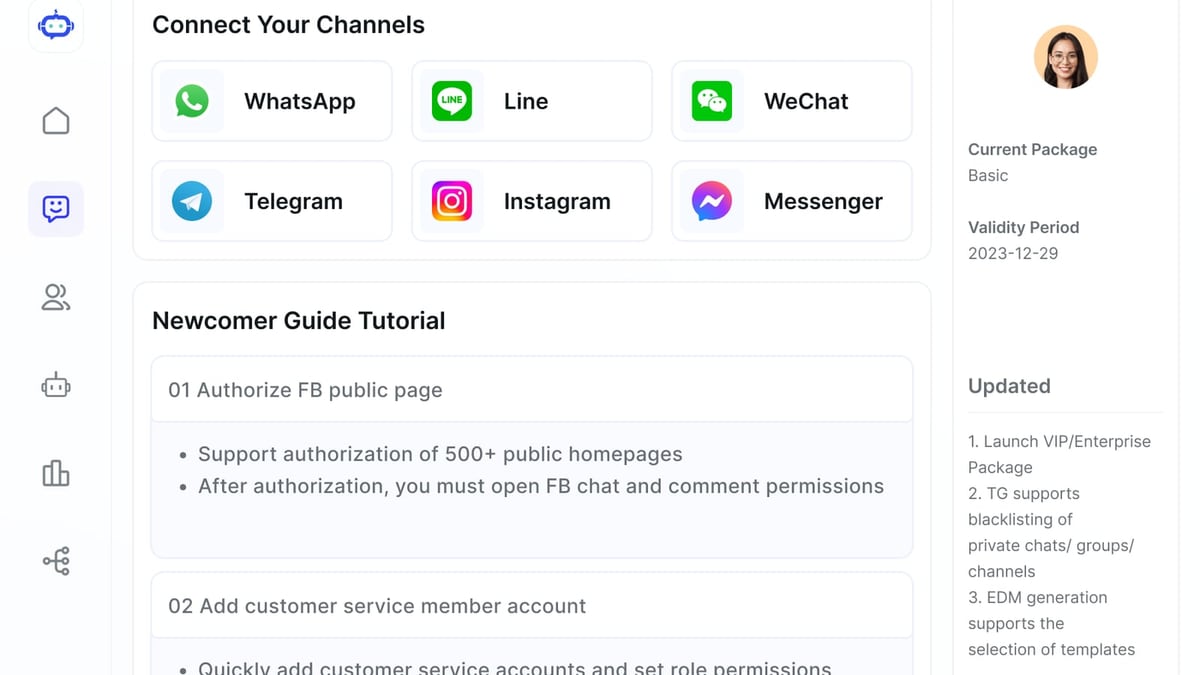
How to Use SaleSmartly with IBM watsonx for AI-Powered Support product interface and feature overview.
Before you start, make sure you have:
- An active SaleSmartly account with access to automation and webhook settings.
- An IBM Cloud account with provisioning for watsonx.ai or watsonx Orchestrate. You’ll need API credentials to call watsonx models.
- A basic understanding of webhooks or REST APIs. No heavy coding is required—similar to connecting SaleSmartly with Zapier via webhooks, which we covered in our SaleSmartly Zapier guide.
- Decided which channels you’ll enable (e.g., WhatsApp, Facebook Messenger, email).
Step-by-Step: Connecting SaleSmartly to IBM watsonx
How to Use SaleSmartly with IBM watsonx for AI-Powered Support product interface and feature overview.
There are two practical approaches: webhook integration using watsonx.ai’s generative API, or configuring SaleSmartly’s native AI Agent to call watsonx models as its brain. The first gives you the most flexibility; the second streamlines the setup within SaleSmartly’s interface.
Option 1: Webhook Integration with watsonx.ai API
Obtain IBM watsonx API credentials
In your IBM Cloud dashboard, navigate to the watsonx.ai service and generate an API key. Note the endpoint URL for text generation (oftenhttps://us-south.ml.cloud.ibm.com/ml/v1/text/generationor similar).Create a SaleSmartly automation rule
Go to Salesmartly Settings > Automation > Rules. Create a new rule triggered by an incoming message from a specific channel (e.g., WhatsApp). Add a condition if needed (e.g., only when the customer’s language is Spanish).Add a Webhook action
For the action, choose “Send Webhook.” Set the method to POST, and enter the IBM watsonx API URL. In the request body, send JSON containing:{ "model_id": "ibm/granite-13b-chat-v2", "input": "{{contact.last_message}}", "parameters": { "max_new_tokens": 200, "temperature": 0.7 }, "project_id": "your-project-id" }Replace
{{contact.last_message}}with the actual placeholder from SaleSmartly’s variable list. Include your API key in the headers:Authorization: Bearer YOUR_IBM_API_KEY.Process the response
watsonx will return a JSON object with generated text. Use SaleSmartly’s response mapping to extract the generated reply and send it back to the customer as an outgoing message. You may need a second action in the same rule: “Send Message,” with the content set to{{webhook_response.generated_text}}.Test and iterate
Send a test message from a connected channel. Check the automation log in SaleSmartly. If the reply isn’t quite right, adjust the prompt in the webhook body—add context like “You are a helpful support agent for an e-commerce store selling electronics” to guide the watsonx model.
Option 2: Using SaleSmartly’s AI Agent with watsonx Models
If you prefer a more visual setup, use SaleSmartly’s built-in AI Agent and point it to watsonx as the brain.
- Deploy a custom model on watsonx (if licensing allows) or use one of the pre-trained foundation models.
- In SaleSmartly, go to AI Agent settings. Enable “Custom AI Provider” and enter the watsonx API endpoint and your credentials.
- Define the agent’s persona, knowledge base, and fallback rules. SaleSmartly will route questions that the AI can’t answer to a human agent according to your assignment rules.
- Monitor performance through SaleSmartly’s analytics dashboards, and use IBM watsonx.governance to track model drift and fairness.
Practical Examples

How to Use SaleSmartly with IBM watsonx for AI-Powered Support product interface and feature overview.
Example 1: Multilingual E-Commerce Support on WhatsApp
A Latin American online store receives customer inquiries in Spanish and Portuguese. With SaleSmartly, all WhatsApp messages are consolidated in one workspace and auto-translated to English for agents. Using the webhook method above, the AI powered by watsonx drafts answers based on the store’s FAQ and product catalog. When a customer asks, “¿Tienen envío internacional?” the AI instantly replies in Spanish with shipping costs and estimated delivery times, pulling data from a connected IBM watsonx.data knowledge base. If the question is too complex, the reply suggests connecting to a human agent, and SaleSmartly’s automation assigns it to the right team based on language and sales category.
Example 2: B2B Lead Qualification via Live Chat and AI
A cross-border SaaS company uses SaleSmartly’s live chat on its website, integrated with Facebook Messenger. When a visitor starts a conversation, SaleSmartly captures their browsing history and creates a contact profile. A separate webhook sends the profile data to IBM watsonx Orchestrate, where a custom AI agent scores the lead based on industry, company size, and behavior patterns. High-scoring leads trigger an instant message: “Hi, I noticed you checked our pricing page. Would you like a personalized demo?” — all automatically. The combination reduces cold outreach time and ensures sales reps only engage warm prospects.
Best Practices for a Smooth Workflow
- Start with a clearly defined prompt for the watsonx model. Include instructions about tone, language, and what to do if it doesn’t know an answer.
- Use SaleSmartly’s real-time translation as a preprocessing step before sending text to watsonx. That way, the AI always works with a consistent language (e.g., English) and the final reply is translated back automatically.
- Set up fallback rules in both systems: if the AI confidence is low, route to a human; if the API call fails, still acknowledge the customer.
- Enable logging and monitoring on both SaleSmartly and IBM watsonx to spot performance gaps. IBM’s governance tools can alert you on hallucination or bias, while SaleSmartly shows resolution times and customer satisfaction.
- Scale gradually: Pilot with one channel and one use case, prove value, then expand. The approach works particularly well for cross-border teams already using tools like those compared in our top 10 omnichannel AI customer service systems review.
Related reading
- SaleSmartly vs Wati vs Zendesk: AI-Powered Customer Engagement Compared - Compare SaleSmartly, Wati, and Zendesk for AI customer engagement. Discover strengths in omnichannel, real‑time translation, WhatsApp commerce, and enterprise AI for cross‑border teams.
- SaleSmartly vs tawk.to vs Zendesk: Cross-Border AI Chat Compared - Compare SaleSmartly, tawk.to, and Zendesk for omnichannel AI customer service, multilingual tools, pricing, and cross‑border capabilities to find the best fit.
Sources and further reading
- IBM Cloud Docs - IBM Cloud Docs
- AI Agents for Sales - IBM watsonx Orchestrate - Enable your sales team to unlock their full potential.
- Creating a generative AI assistant with IBM watsonx Orchestrate - Enjoy the videos and music you love, upload original content, and share it all with friends, family, and the world on YouTube.
Frequently Asked Questions
Do I need to write code to connect SaleSmartly and IBM watsonx?
No. Using SaleSmartly’s built-in webhook actions or custom AI provider field, you can set up the integration without writing any code—just configure API endpoints and map variables. If you’ve used our Zapier integration guide, you’ll find this similarly straightforward.
Which IBM watsonx plan do I need?
At minimum, the watsonx.ai Standard plan that allows API calls to foundation models. For advanced automation, such as AI agents that orchestrate multiple tasks, the watsonx Orchestrate plan is required. You can start with a limited trial to test the connection.
Can I keep using SaleSmartly’s own AI Agent alongside watsonx?
Yes. SaleSmartly’s native AI works well for simple FAQs. You can route complex or domain-specific queries to the watsonx-powered flow via conditions in automation rules, effectively combining both AIs.
Is this setup secure for handling customer data?
Both platforms offer enterprise-grade security. SaleSmartly holds ISO 27001 and ISO 27701 certifications. IBM watsonx provides data isolation, encryption in transit and at rest, and full AI governance. Always follow your region’s data residency requirements when configuring cloud services.
Conclusion
Integrating SaleSmartly’s omnichannel prowess with IBM watsonx’s enterprise AI turns a good customer communication tool into a formidable intelligent assistant. You solve the fragmentation problem, break down language barriers, and let AI handle the bulk of routine interactions while your team focuses on building relationships. The setup requires only API credentials and a few automation rules—well within reach for most cross-border teams. Start small, measure the impact on response times and lead conversions, and then expand to more channels. At SaleSmartly, we’ve seen this combination reduce manual effort by over 40% for online retailers operating in multiple regions, proving that the right tech stack doesn’t just cut costs—it unlocks growth.
Ready to dig deeper? Check out how SaleSmartly stacks up against Intercom for cross-border AI chat or explore the full list of top omnichannel platforms to see where this integration shines among its peers.