
WhatsApp Review 2025: Is It Still Worth Using?
With over 3 billion users across 180 countries, WhatsApp is the planet's most popular messaging app. It promises free, simple, and secure communication—but Meta’s ownership keeps raising tough questions about privacy and how your data gets handled. We’ve tested the app’s day-to-day experience, dug into its encryption claims, and compared it with rivals to help you decide if WhatsApp deserves a permanent spot on your home screen.
What Is WhatsApp?
WhatsApp Review 2025: Is It Still Worth Using? - supporting product research image 1.
WhatsApp is a cross-platform messaging and calling app available on Android, iOS, and the web. It needs a valid phone number and birthdate to register, then lets you send texts, voice messages, images, videos, and files. End-to-end encryption (E2EE) built on the Signal Protocol is on by default for all personal chats and calls, meaning only the sender and recipient can read or hear them. The app also offers a separate WhatsApp Business version for small businesses and an API for larger teams.
Key Features: Messaging, Calls, and Media
- Rich messaging: Text, voice messages, stickers, GIFs, reactions, and file sharing up to 2GB.
- Voice and video calls: One-on-one and group calls (video supports up to 32 people).
- Communities and Channels: Organize related groups into Communities, follow topics via Channels.
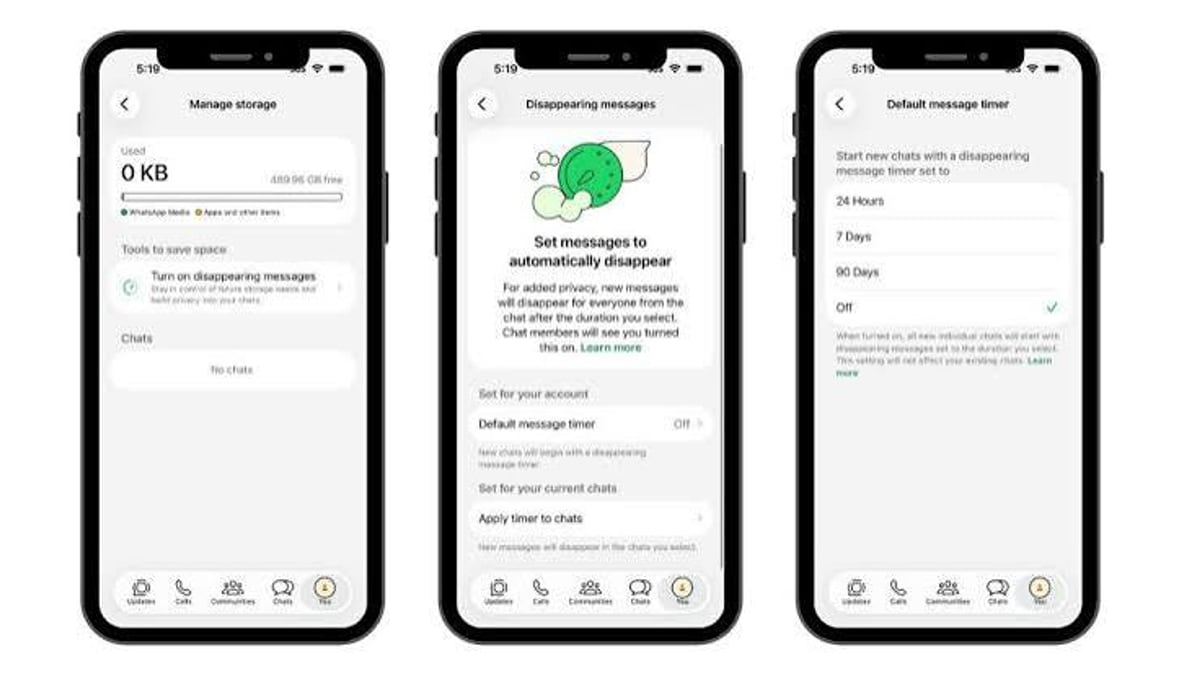
- Disappearing messages: Set chats to auto-delete after 24 hours, 7 days, or 90 days. View-once media adds extra privacy.
- Chat Lock: Hide sensitive conversations behind biometrics or a secret code.
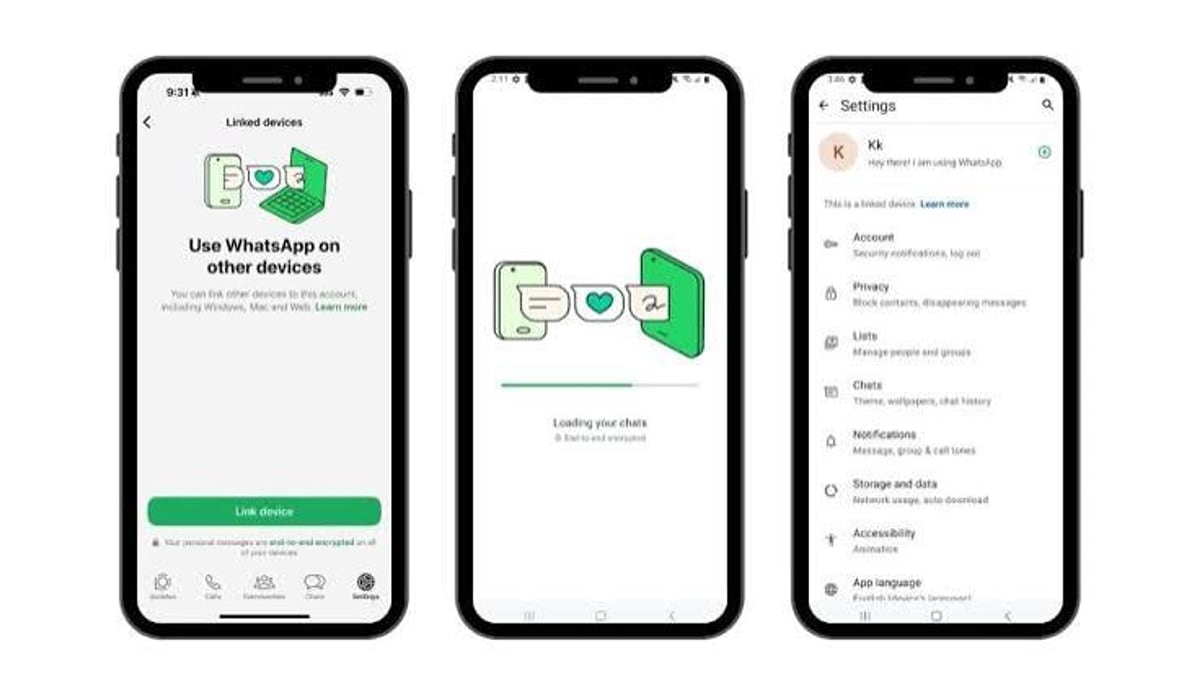
- Multi-device support: Link up to four other devices without your phone staying online.
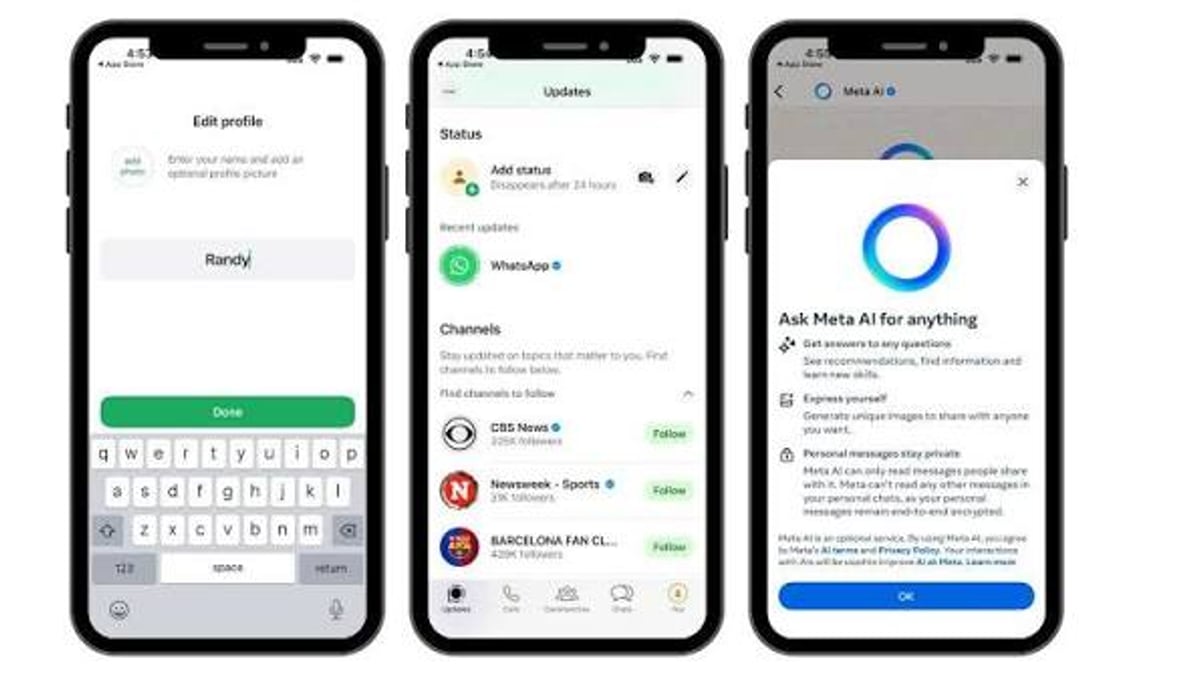
- Meta AI: An optional chatbot that can generate images, answer questions, and summarize chats (English only). Be aware: message content shared with Meta AI may be used to train its models.
Privacy and Security: The Meta Dilemma
WhatsApp Review 2025: Is It Still Worth Using? - supporting product research image 4.
WhatsApp’s encryption is technically solid—it uses the same Signal Protocol praised by security researchers. Independent audits confirm that the company can’t read your personal messages. Features like link preview disabling, call IP protection, and screenshot blocking for view-once images add practical guards.
However, trusting the app is more complicated because Meta owns it. While WhatsApp’s privacy policy states Meta cannot see your contacts or message content, it does expose your phone number, IP address, and any interactions with business accounts. Those interactions can be used for targeting ads across Meta’s ecosystem. Security experts at PCMag note that this metadata collection, combined with Meta’s history of data scandals, makes it harder to recommend WhatsApp as a privacy-first app. Signal, which requires no phone number or birthdate for username use, remains the Editors' Choice for truly private messaging.
You can tighten your settings with the built-in Privacy Checkup, which walks you through who can see your profile photo, add you to groups, or see your online status. Encrypted backups are available, though unencrypted ones still exist for easy phone transfers. Still, if absolute anonymity matters, WhatsApp’s requirement of a real phone number and birthdate—and its lack of username-only discovery—is a dealbreaker.
WhatsApp Business: Scaling Customer Conversations
WhatsApp Review 2025: Is It Still Worth Using? - supporting product research image 2.
For small shops, the free WhatsApp Business app offers a product catalog, quick replies, and labels. Larger operations can use the WhatsApp Business API to integrate the channel into their CRM. The catch? Native tools don’t give you a shared team inbox, advanced automation, or cross-channel visibility.
That’s where third-party platforms fill the gap. For instance, SaleSmartly (an SaleSmartly solution) unifies WhatsApp with Facebook Messenger, Instagram, email, and live chat in one omnichannel inbox. Its AI agent can handle FAQ, route chats, and even translate conversations in real time across 134 languages—without charging per contact. If you’re comparing options, we break down how it stacks up against free live chat in our SaleSmartly vs tawk.to comparison. For teams that need to sync WhatsApp leads to a CRM automatically, our no-code guide to using SaleSmartly with Zapier shows you how to set up triggers and actions without writing a line of code. And if you run Meta ads, you can connect WhatsApp replies directly to your campaigns—see our step-by-step walkthrough on using SaleSmartly with Meta for Business.
Setup and User Experience
Getting started takes minutes. Install the app, verify your number via SMS, add your birthdate, and optionally allow contact syncing. The interface is clean: chats are grouped in a main list, calls and status tabs are one tap away. Linking a desktop or web app is a simple QR code scan.
One pain point: if your number or activity is flagged for violating terms—spam, scams, or unauthorized third-party clients—WhatsApp can ban your account. When that happens, you’ll see an in-app message offering a review request. According to WhatsApp’s help center, most reviews finish within 24 hours, but some bans are final and can’t be appealed. You can’t access chat history during a ban, and third-party services can’t remove a ban. This all-or-nothing approach frustrates many users, as reflected in over 2,000 Trustpilot reviews that average a poor 1.5-star rating—largely driven by sudden bans and unresponsive support.
WhatsApp vs. Alternatives: Signal and Telegram
WhatsApp Review 2025: Is It Still Worth Using? - supporting product research image 3.
If privacy is your top priority, Signal is the clear winner. It also uses the Signal Protocol, but collects almost no metadata and allows username-based contact without sharing your phone number. Telegram, on the other hand, offers larger groups (up to 200,000 members) and more customizable features, but its E2EE is not default for all chats—secret chats only.
Decision guide:
- Choose WhatsApp if you need to reach the widest possible circle; most of your contacts are already on it.
- Choose Signal if you want the strongest privacy and don’t mind convincing friends to switch.
- Choose Telegram if you value massive community building and don’t rely on universal encryption.
The User Verdict: What People Really Say
User reviews paint a stark contrast. Tech reviewers laud the app’s ease of use and encryption. PCMag’s hands-on impression praises the interface and consistent feature updates. Meanwhile, Trustpilot is flooded with complaints about sudden account bans, poor customer support, and frustration over lost contacts. This divide reveals a reality: WhatsApp works beautifully as long as you stay within its rules, but a single algorithmic flag can lock you out with little recourse.
Related reading
- How to Use SaleSmartly with Zapier: A No-Code Guide - Learn how to connect SaleSmartly and Zapier using webhooks to automate chat workflows, sync leads, and reduce manual work. No native integration? No problem.
- SaleSmartly vs HubSpot vs Intercom: Cross-Border Omnichannel AI Compared - Compare SaleSmartly, HubSpot, and Intercom for omnichannel messaging, AI translation, CRM, and pricing. Find the best cross-border customer engagement platform.
- SaleSmartly vs tawk.to: Omnichannel AI vs Free Live Chat Compared - Comparing SaleSmartly's omnichannel AI customer service and marketing platform with tawk.to's free live chat. Discover which tool fits your cross-border business needs, from WhatsApp integration to AI agents.
FAQ
Is WhatsApp really end-to-end encrypted?
Yes. All personal messages, voice calls, and video calls are encrypted from sender to receiver using the Signal Protocol. WhatsApp can’t read them. However, interactions with business accounts and metadata like your phone number are not encrypted in the same way and can be accessed by Meta.
Can WhatsApp read my messages?
No. The content of your personal chats is encrypted. But if you use Meta AI, the messages you share with the chatbot may be stored and used to train Meta’s AI.
What is WhatsApp Business, and is it free?
The WhatsApp Business app is free for small businesses and includes a catalog, labels, and quick replies. The WhatsApp Business API, designed for larger teams, charges per conversation after a free tier. Third-party tools like SaleSmartly often bundle API costs into their plans.
Why was my WhatsApp account banned?
Bans usually occur for violating Terms of Service—spam, scams, using unofficial apps, or automated bulk messaging. You can request a review through the app if the option appears. Bans are final if no review option is given.
Is WhatsApp free?
Completely free for personal use. No subscription, no ads in chats. Meta monetizes by offering business tools and leveraging business interaction data.
Can I use WhatsApp on multiple devices?
Yes. You can link up to four companion devices (phone, tablet, desktop, web) via QR code. Even if your main phone is offline, linked devices still work.
Conclusion
WhatsApp earns its ubiquity by being dead simple, reliable, and packed with communication features that billions rely on every day. The encryption foundation is solid, and the app is consistently updated. But Meta’s metadata collection and the lack of anonymous sign-up keep it from being the privacy champion that Signal is. For businesses, WhatsApp’s reach is unmatched—yet to handle conversations at scale, you’ll likely need a platform like SaleSmartly that brings AI automation, omnichannel routing, and real team collaboration to the table.
Should you keep using WhatsApp? For staying in touch with family, friends, and local groups, the answer is yes—it simply dominates the network effect. If you want to keep conversations genuinely confidential or run a business that handles sensitive customer data, pair WhatsApp with tools that give you control and visibility beyond the default inbox.