
How to Use SaleSmartly with Salesforce Agentic CRM
Bring your front-line omnichannel messaging and AI customer service together with the world's leading agentic CRM. This guide shows you exactly how to integrate SaleSmartly and Salesforce Agentic CRM—so every WhatsApp, Messenger, or Instagram chat becomes a fully tracked, intelligent customer record that drives sales and support.
Why Combine SaleSmartly and Salesforce Agentic CRM?

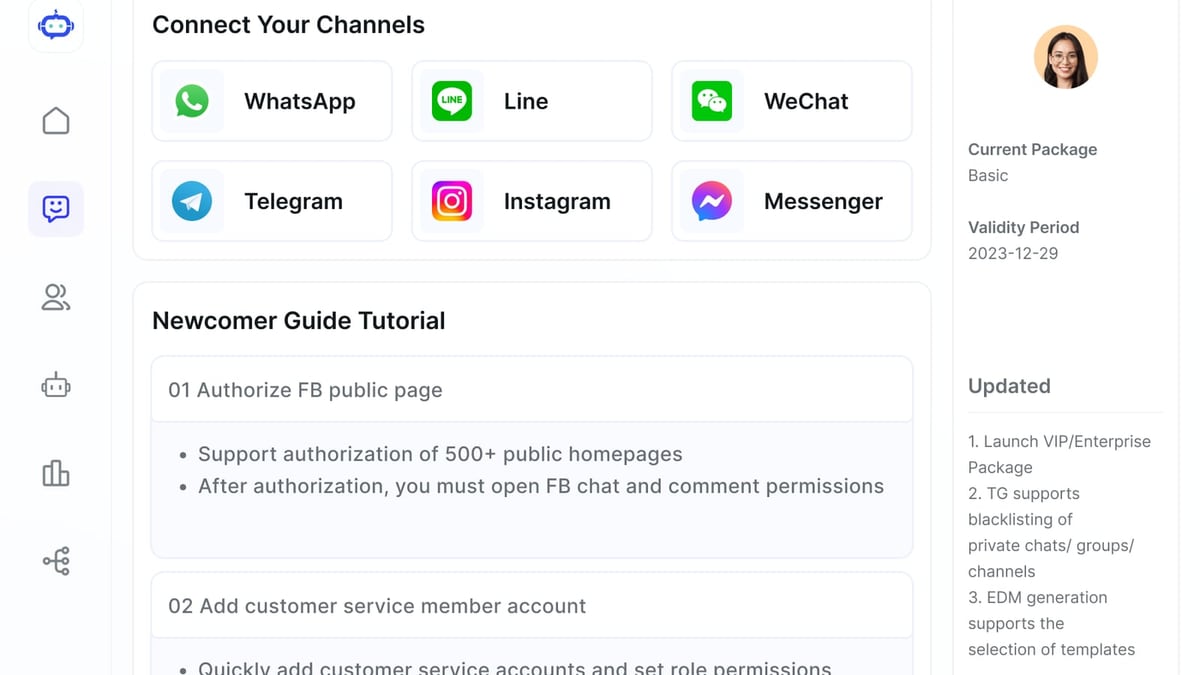
How to Use SaleSmartly with Salesforce Agentic CRM product interface and feature overview.
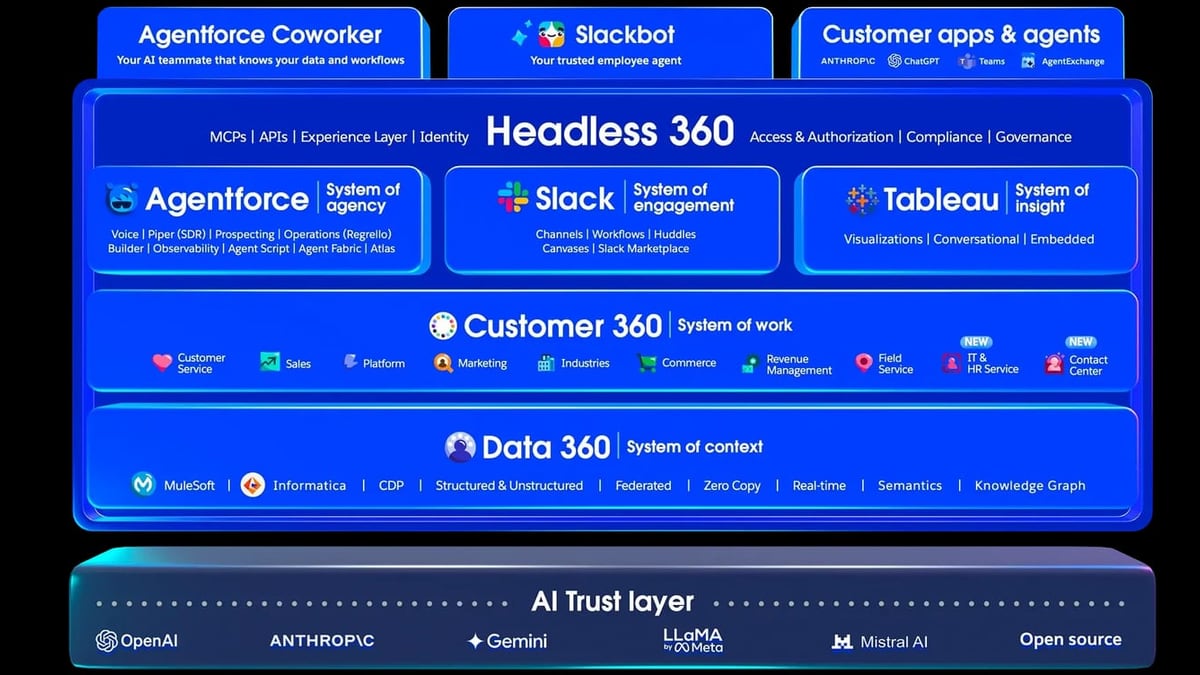
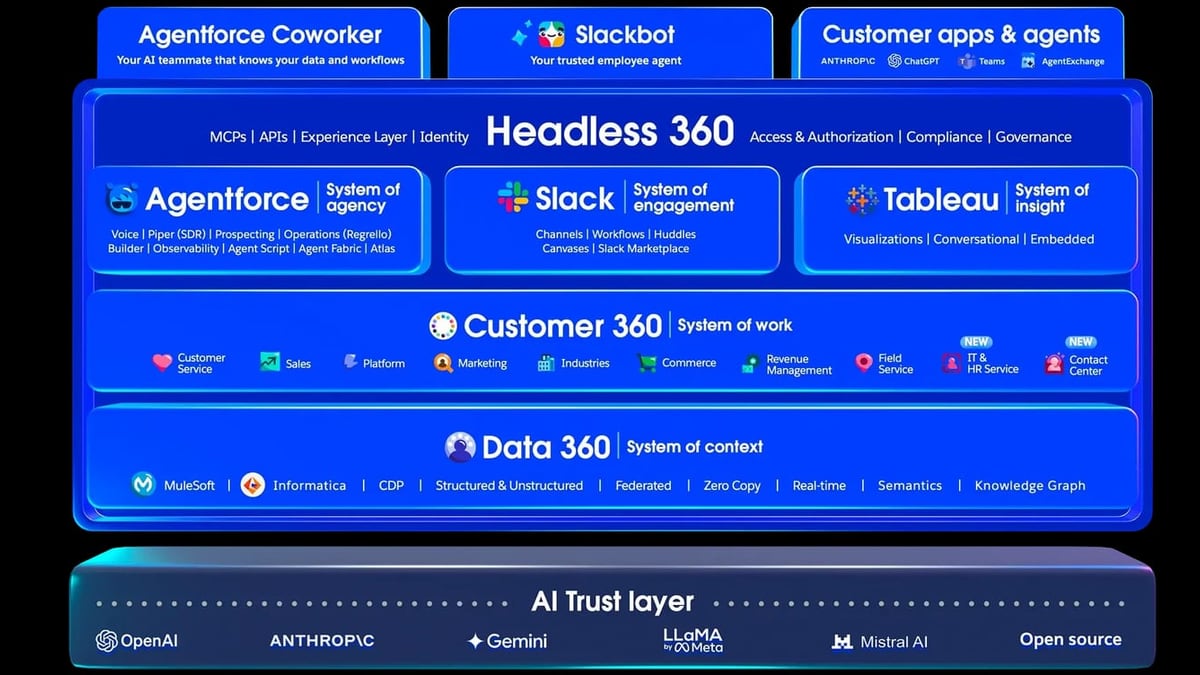
Salesforce is the #1 Agentic CRM, turning companies into agentic enterprises where humans and AI agents collaborate seamlessly. SaleSmartly is an omnichannel messaging and AI customer service platform built for cross-border teams. Alone, each is powerful. Together, they bridge the gap between real-time conversations on WhatsApp, Facebook Messenger, Instagram, Telegram, and more, and the deep automation, lead management, and case resolution power of Salesforce's Agentforce.
Here's how the synergy works:
- SaleSmartly captures conversations from 10+ channels, uses AI agents to handle first-line queries, and translates messages instantly in 134 languages.
- Salesforce Agentic CRM receives the conversation data, enriches leads/contacts, and runs Agentforce agents to execute complex workflows—updating records, creating opportunities, and drafting multilingual replies.
- The loop closes when Salesforce posts the response back to SaleSmartly, and the customer sees a helpful, contextual answer in their original channel.
No more switching between systems. No more copy-pasting. Just one unified, intelligent customer experience.
Prerequisites
How to Use SaleSmartly with Salesforce Agentic CRM product interface and feature overview.
Before you begin, make sure you have:
- A SaleSmartly account with at least one messaging channel already configured (e.g., WhatsApp connected).
- A Salesforce org with API access (Enterprise, Unlimited, or Performance editions work best) and Agentforce enabled.
- A method for passing data between the two platforms—typically a combination of SaleSmartly's automation webhooks and Salesforce REST APIs.
- Basic familiarity with Salesforce Flows, Apex, or a middleware like Zapier/Make to bridge the integration if you prefer low-code options.
Step-by-Step Integration Workflow
How to Use SaleSmartly with Salesforce Agentic CRM product interface and feature overview.
We'll set up a two-way data flow: SaleSmartly pushes chat events into Salesforce, and Salesforce sends agent‑driven replies back to the chat.
1. Capture Conversations in SaleSmartly
In SaleSmartly's dashboard, go to Automation → Rules (or Flows). Create a new rule triggered on a specific event—for example, "New message from visitor" when the visitor's message contains a certain keyword or comes from a defined channel. The action will be a webhook that POSTs the contact details, message text, language, and channel ID to your Salesforce endpoint.
Pro tip: If you haven't yet connected a specific channel, check our dedicated guide on how to use SaleSmartly with WhatsApp. The setup logic is similar for Messenger, Instagram, and other channels.
2. Create a Salesforce Endpoint
In Salesforce, build a secure REST API to receive SaleSmartly's payload. You can do this with:
- An Apex REST class that accepts JSON, creates or updates a Lead/Contact, and spawns a Case or Task.
- A Platform Event triggered by an External Service registration.
- A declarative approach using Salesforce Functions or middleware like MuleSoft.
For simplicity, we recommend a custom REST endpoint. The class should:
- Parse the webhook JSON.
- Look up an existing Lead/Contact by email or phone; if none, create a new Lead with source tagged "SaleSmartly".
- Attach the conversation snippet to a new Case, then call an Agentforce agent.
3. Configure Agentic Logic in Salesforce
Now the real power kicks in. When a Case is created, use Salesforce Flows to launch an Agentforce agent that can:
- Determine intent and sentiment.
- Search knowledge articles or run a pricing calculation.
- Update the Case with a draft reply.
- Route the Case to the correct queue or notify a human via Slack.
Make sure to test your automation thoroughly before going live. As the Salesforce blog on AI workflow automation explains, always validate agent behavior with sandbox environments and real-world test scenarios.
4. Send Replies Back to the Customer
Once your Agentforce agent has drafted a response, a Flow or an invocable Apex method calls the SaleSmartly API to push the reply into the same conversation. You'll need:
- The SaleSmartly visitor ID or channel identifier (passed from the original webhook).
- A SaleSmartly API key with message-send permissions.
- The message text, which can include dynamic CRM data (order status, shipping date, etc.).
SaleSmartly then delivers the reply in the original channel, maintaining the conversation thread.
5. Test the Full Loop
Simulate a customer message from WhatsApp or Messenger. Watch SaleSmartly's rule fire, the webhook land in Salesforce, a Case appear, Agentforce process it, and the reply appear in the chat. Use a Salesforce sandbox and SaleSmartly's test contacts until everything runs smoothly.
Practical Example: Automated Lead Qualification on WhatsApp
How to Use SaleSmartly with Salesforce Agentic CRM product interface and feature overview.
Imagine a global e‑commerce brand selling handmade furniture. A prospect from Brazil sends a WhatsApp message: "Do you ship to São Paulo?"
- SaleSmartly receives the message, detects Portuguese, translates it for the back office, and triggers the automation rule.
- The webhook posts the visitor's name, number, and query to Salesforce.
- Salesforce creates a Lead, then fires an Agentforce agent.
- The agent checks the shipping policy, confirms stock availability, and composes a reply in Portuguese: "Sim, enviamos para São Paulo em 3–5 dias úteis. Deseja fazer o pedido?"
- That reply is pushed back to SaleSmartly and sent to the WhatsApp chat—all in under three seconds.
If the prospect shows buying intent, the Salesforce agent can escalate the Lead into an Opportunity and send a Slack notification to a sales rep, complete with a summary of the conversation.
For teams looking to scale this kind of intelligent automation, our roundup of the top AI workflow automation platforms offers additional tools to complement your stack.
Problems This Integration Solves
Disconnected customer views – Without integration, chat history lives in SaleSmartly and CRM data in Salesforce. The bridge gives you a true 360‑degree customer profile.
Manual lead entry – No more copying WhatsApp messages into Salesforce. Leads are created and enriched automatically from the first message.
Slow response times – SaleSmartly's AI agents handle initial deflection, while Salesforce's Agentforce takes over for complex queries and processes, all in real time.
Language barriers – SaleSmartly's real‑time translation across 134 languages combines with Salesforce's ability to reply in the visitor's language, removing friction from global support.
Siloed automations – SaleSmartly agents can only react to conversations; by linking to Salesforce you trigger multi‑step business processes like payment follow‑ups, contract generation, or field service dispatches.
Why the Combo Beats Standalone Solutions
Some teams try to use only SaleSmartly for messaging, but leads can fall through the cracks without a CRM. Others use Salesforce Service Cloud alone, but miss out on the wide reach of SaleSmartly's channels—Telegram, LINE, VK, and more—especially important for cross-border businesses. Combining the two ensures every chat becomes a trackable record and every automated action is grounded in accurate customer data.
If you're evaluating different chat platforms, our SaleSmartly vs Olark comparison shows why SaleSmartly is the stronger pick for global teams—and pairing it with Salesforce makes it a true enterprise‑grade solution.
Related reading
- SaleSmartly vs SleekFlow vs DelightChat: 2026 Buyer’s Guide - Compare SaleSmartly, SleekFlow and DelightChat on omnichannel messaging, AI agents, pricing and ecommerce features. Find the best fit for your Shopify or global business in 2026.
- Top 10 Web Analytics Platforms 2026: Expert Picks - Compare the 10 best web analytics platforms in 2026. From GA4 to Mixpanel, our expert review covers features, pricing, and ideal use cases to match your team’s needs.
Sources and further reading
- Getting Started with Salesforce | The #1 Agentic CRM - Get started with Salesforce — the #1 Agentic CRM. Talk to sales, start a free 30-day trial, explore Agentforce, learn AI skills on Trailhead, and find the right partner to grow your business.
- A Step-by-Step Guide to Agentic AI - Create your AI strategy and find the best use cases. Our playbook has lessons, examples and tips for building an agentic enterprise.
FAQ
Q: Do I need a Salesforce developer to build this integration? A: Basic integration can be set up with webhooks and declarative Flows. For custom REST endpoints and Agentforce calls, a few lines of Apex help, but you can also use middleware like Zapier or Make. Deeper agentic automation typically benefits from a developer.
Q: Is the data transfer real‑time? A: Yes. Webhooks and APIs ensure near‑instant information exchange. Latency is usually under one second, so customers won't notice a delay.
Q: Will SaleSmartly's AI agents conflict with Salesforce Agentforce? A: Not if you define clear handoff rules. Let SaleSmartly handle conversational deflection and simple FAQ replies, and escalate only when CRM context is needed. That way the two agentic systems complement each other.
Q: How does Slack fit into this combination? A: Salesforce natively integrates with Slack. After Agentforce processes a case, it can post a summary into a Slack channel, letting a human rep jump in with full context whenever necessary.
Conclusion
Linking SaleSmartly with Salesforce Agentic CRM turns your customer communication into a single, intelligent, and automatic system. You get the omnichannel reach and AI‑powered front‑end of SaleSmartly, plus the deep agentic automation and customer data mastery of Salesforce. Start with one channel like WhatsApp, prove the value, and then expand the integration across every touchpoint.
For more guidance on building powerful messaging stacks, check how SaleSmartly helps teams compare tools and make data‑backed decisions—or see our guide on using SaleSmartly with IBM watsonx for another advanced AI integration.